
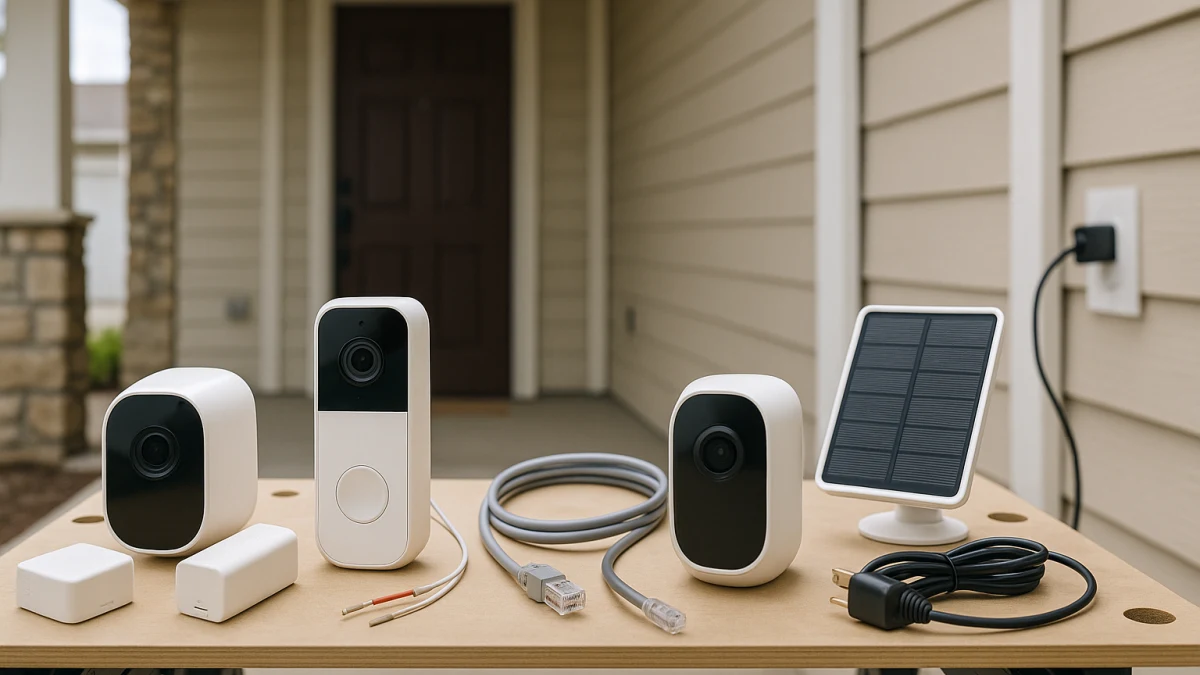
Power is the first installation constraint, not an afterthought. A normal security camera category page can mix wireless networking, battery power, corded cameras, hardwired doorbells, PoE-style cameras, and solar accessories as if they solve the same problem. They do not.
Use this guide to separate the real power paths: no wiring, existing low-voltage doorbell wiring, a cable-routed fixed camera spot, a nearby household outlet, or solar assistance for a rechargeable battery setup. The goal is to help you choose a camera or video doorbell you can actually power, mount, and maintain in the location you care about.
Start with the power you can actually provide
| If this sounds like your install spot | Better fit |
|---|---|
| No wiring at the coverage spot and you can handle charging or battery swaps | Battery-powered security camera or video doorbell |
| Existing compatible low-voltage doorbell wiring at the front door | Hardwired video doorbell |
| A fixed outdoor or perimeter camera location where cable routing is acceptable | Wired or PoE-style security camera |
| A room, garage, or covered area with a nearby household electrical outlet | Plug-in security camera |
| Battery-style outdoor placement with a supported panel and enough sunlight | Solar-assisted camera or doorbell setup |
Before comparing products, ask five practical questions: what power is available at the install point, how much battery maintenance you will tolerate, whether a doorbell needs voltage and chime compatibility, whether you are willing to route cable, and whether the device and its power accessories are suitable for the intended indoor or outdoor exposure.
Start with wires, outlets, cable routing, and recharging
Use the power situation at the location to narrow the page:
- No wiring nearby: look for Battery Powered, Rechargeable, Batteries Required, Battery Life, and Battery Capacity details.
- Existing doorbell wires: look for Hardwired, Requires Existing Wiring, Wired 16-24V AC, transformer language, and chime compatibility.
- Cable-routed fixed camera spot: look specifically for Power over Ethernet, PoE Support, or RJ45 Ethernet details.
- Nearby outlet: look for plug-in, Corded Electric, household electrical outlet, power adapter, DC input, or adapter specs.
- Battery location with sun exposure: treat Solar or Solar panel language as possible help with charging, not as a universal replacement for batteries or wiring.
When wired, wireless, hardwired, and plug-in do not mean the same thing
The confusing part is that product listings often use overlapping words. Wireless may describe Wi-Fi connectivity, not battery power. A wireless camera can still need an outlet, and a battery camera can still connect wirelessly.
Wired is also not one thing. A hardwired video doorbell uses existing low-voltage doorbell wiring. A PoE-style security camera uses Ethernet-style cabling for a fixed camera location. A plug-in camera uses a household outlet and an adapter. Those are different installation paths, so do not treat one wired label as proof that another wired setup will work.
Solar belongs at the edge of the decision. It can support a rechargeable battery setup when the product, panel, placement, and sunlight cooperate, but it should not be read as the same kind of continuous-power path as hardwired, PoE-style, or plug-in power.
Power evidence the widgets can and cannot prove
The product groups below are organized around visible power terms, not around broad camera popularity. Battery and plug-in cameras are more broadly represented, hardwired doorbells are a doorbell-specific lane, PoE-style cameras are a narrow standalone camera lane, and solar-assisted options are a secondary battery-maintenance lane.
Use the products shown here to compare power setup, not to assume model-specific promises. Battery life, recharge frequency, transformer fit, chime behavior, adapter suitability, outdoor use, and weather-rating details still need to be checked on the product page and manufacturer specifications.
Battery-powered cameras for places without wiring
Choose this path when the coverage spot does not have practical wiring and you are willing to manage charging, battery swaps, or model-specific runtime limits. The useful terms are Battery Powered, Rechargeable, Batteries Required, Battery Life, Battery Capacity, and Indoor/Outdoor.
This lane is about placement flexibility. It can work for spots where running cable or finding an outlet is inconvenient, but a wireless listing is not automatically battery-powered. If the product page does not clearly show battery or rechargeable details, do not assume it will be maintenance-free or wire-free.
Read these products by comparing how each one describes its power source and battery maintenance. If you have a nearby outlet, existing doorbell wiring, or a realistic cable route, one of the continuous-power lanes below may reduce the amount of charging you need to think about.
Hardwired video doorbells for existing low-voltage doorbell wiring
This is the front-door lane for shoppers who already have doorbell wires and want a video doorbell designed for continuous wired power. Look for Hardwired, Wired, Corded Electric, Requires Existing Wiring, existing doorbell wires, or Wired 16-24V AC.
Do not stop at the word wired. Check the voltage range, transformer language, chime compatibility, chime-related specs, and whether a chime is included. A hardwired doorbell is not the same thing as a PoE camera, a plug-in camera, or a battery-powered camera.
The products shown here help you compare doorbell-specific wired options. They are a good starting point if your home already has doorbell wiring, but compatibility with your exact transformer, chime, and doorbell circuit is model-specific.
Doorbell wires still need a voltage and chime check
Existing wires are only the beginning. A doorbell that lists Wired 16-24V AC or similar language may still have specific transformer and chime requirements. Some listings mention a chime, chime compatibility, or included chime hardware; others require you to confirm those details separately.
Before buying, compare your current setup with the manufacturer specifications for that exact doorbell. This page can help you choose the right lane, but it does not replace model-specific electrical compatibility information.
PoE-style cameras for fixed, cable-routed coverage
Choose a PoE-style camera only when you are planning a fixed camera location and cable routing is acceptable. The key terms are Power over Ethernet, PoE Support, and RJ45 Ethernet or network-interface details, not generic wired language by itself.
This is a narrow product set, so treat it as a specific cable-routed camera option rather than a guide to every wired camera setup. If you do not want to plan cable routing, compare plug-in cameras for outlet-ready spots or battery-powered cameras for no-wiring placement.
PoE-style stops at camera power, not whole-system networking
PoE-style power is included here only as a standalone camera power path. This is not an NVR, DVR, BNC, channel count, hard-drive, kit, or whole security-camera-system guide.
If your project is really about designing a multi-camera recording system or network layout, that is a different buying decision. For this page, the practical question is simpler: can the fixed camera location support the required cable path, and does the product page clearly identify PoE-style power support?
Plug-in cameras for outlet-ready rooms, garages, and covered spots
A plug-in camera makes sense when you have a household electrical outlet near the coverage area and you want to avoid routine battery charging. Look for plug-in, Corded Electric, household electrical outlet, power adapter, AC adapter, DC input, or adapter specs such as 5V/2A where the listing provides them.
This lane is different from hardwiring. The camera depends on outlet placement, adapter suitability, and a cable path that will not be in the way. For garages, covered entries, or other edge locations, also check Indoor/Outdoor use, weather-resistance language, and whether the adapter and cable setup are appropriate for that environment.
Use these products to compare outlet-powered cameras that can reduce battery maintenance where an outlet is practical. Do not assume plug-in power means continuous recording, a specific storage behavior, or exposed outdoor suitability; those details depend on the individual model.
Solar-assisted cameras as help for battery maintenance
Solar is best treated as a helper for battery-style placement, not as a fifth co-equal power path. Look for Solar, Solar panel, solar powered, Battery, and Rechargeable battery language, then check panel placement, sunlight exposure, Indoor/Outdoor use, and weather-rating details.
The products shown here are best read as camera-oriented solar-assisted options. They may help reduce recharge frequency in the right setup, but they do not prove that charging disappears, and they should not be used as proof of solar video doorbell compatibility.
Final power-fit checks before you mount anything
Before you buy, confirm the power details that match your lane:
- Battery-powered cameras: check Power Source, Batteries Required, Rechargeable, Battery Life, Battery Capacity, and whether the model is listed for the intended indoor or outdoor use.
- Hardwired video doorbells: check Requires Existing Wiring, Wired 16-24V AC or stated voltage range, transformer requirements, chime compatibility, and whether a chime is included.
- PoE-style cameras: check Power over Ethernet, PoE Support, RJ45 or Ethernet network-interface language, Indoor/Outdoor use, and weather-rating details.
- Plug-in cameras: check the included power adapter, AC or DC input, outlet distance, cable placement, and whether the adapter setup fits the intended location.
- Solar-assisted cameras: check the solar panel details, rechargeable battery support, expected mounting position, sunlight exposure, Indoor/Outdoor use, and weather-rating language.
Pick the product lane your location can actually support first. After that, compare camera features within that lane, but do not skip the model-specific voltage, chime, adapter, weather, and battery checks that determine whether the device will work where you plan to mount it.