
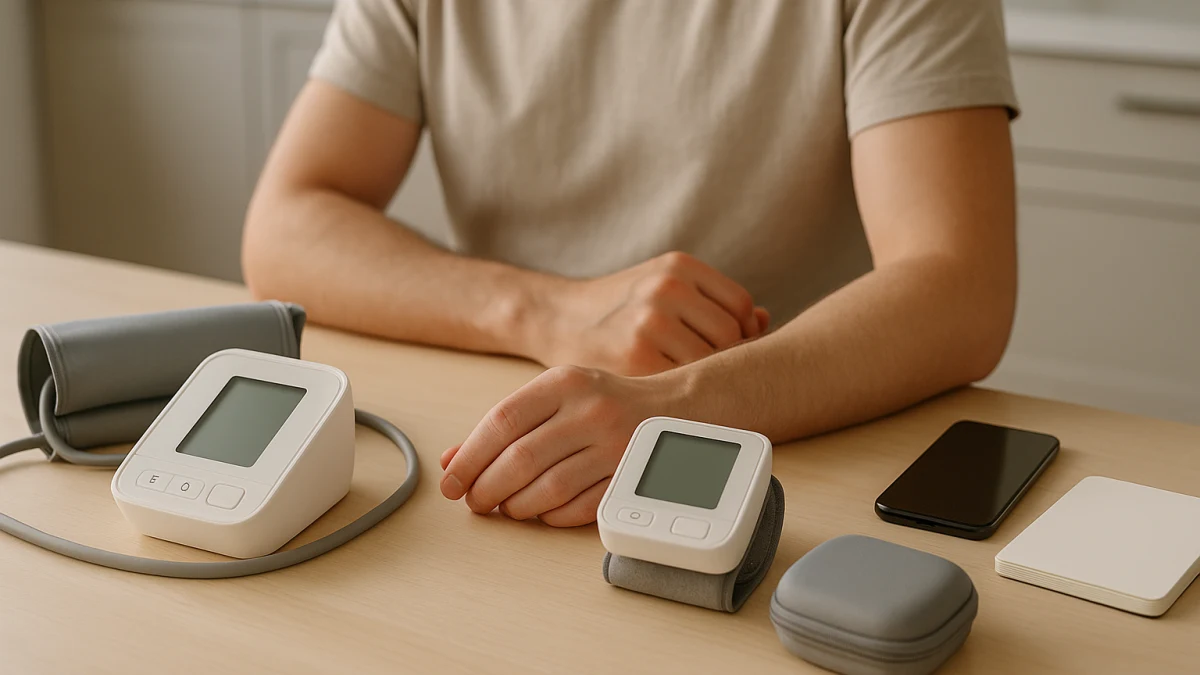
Upper-arm and wrist blood pressure monitors can look similar on a product grid because many listings emphasize Bluetooth, memory, large displays, or app features. This comparison starts one step earlier: where the cuff goes, how consistently you can place it, and whether daily use will be comfortable enough to repeat.
Use this page to separate the form-factor decision from feature browsing. Upper-arm monitors are the conventional path when cuff fit and placement are manageable. Wrist monitors are mainly worth considering when arm-cuff discomfort, travel storage, portability, or mobility constraints make the upper-arm setup harder to use. After that, compare screen readability, controls, logging, power, voice features, and carrying details inside the lane that actually fits your routine.
Start with cuff placement before app features
| If your main need is... | Better fit |
|---|---|
| You can apply an upper-arm cuff comfortably and want a conventional setup for repeated home readings. | Upper-arm blood pressure monitors |
| Arm-cuff discomfort, travel storage, or mobility constraints make a wrist format more practical. | Wrist blood pressure monitors |
| You mainly need Bluetooth, Android or iOS compatibility, memory, or app sync for logging. | Choose the form factor first, then use logging features as filters inside that lane. |
| You are shopping for smartwatch blood pressure features, wearable ECG, pulse oximeters, or glucose monitors. | Outside this collection |
The practical comparison is not just arm versus wrist. Check cuff fit first, then think about positioning discipline, display readability, button or touchscreen controls, logging workflow, power source, and whether you need a carrying case. Bluetooth, app sync, memory capacity, user profiles, Android or iOS compatibility, and voice features can be useful, but they do not solve the wrong cuff location.
Cuff-first verdict: arm if it fits, wrist if the cuff is the blocker
- Choose the upper-arm lane if an upper-arm cuff is comfortable to wrap, tighten, and place the same way each time.
- Consider the wrist lane if the arm cuff is the reason you avoid taking readings, if storage and travel matter, or if mobility makes an upper-arm cuff awkward.
- Do not let a large display, app sync, or memory capacity decide the purchase before you know which cuff format you can use consistently.
- If two products look similar on logging features, favor the one whose cuff location and controls create less daily friction for you.
Not smartwatches, not diagnosis, not a replacement for clinician readings
This collection is limited to home blood pressure monitors in upper-arm and wrist formats. It is not a guide to smartwatch blood pressure features, wearable ECG devices, pulse oximeters, glucose monitors, or general hypertension management.
It also does not interpret readings or replace clinician measurement. If you need medical interpretation, treatment advice, or confirmation of what a reading means for your care, use the appropriate clinical source rather than a product listing.
Feature listings are not validation proof
Product pages can help you compare practical features: cuff location, display type, Bluetooth, app sync, memory, voice guidance or voice broadcast, power source, user profiles, and carrying case details. Those features are shopping filters.
Do not treat them as proof that a monitor is clinically validated, FDA-cleared, approved, diagnostic, or medically accurate. If validation, regulatory status, or a specific medical claim matters to your purchase, check official documentation or the manufacturer source before relying on it.
Upper-arm monitors when cuff fit is manageable
Start here if you can comfortably use an upper-arm cuff and want a conventional home setup for repeated readings. The products shown in this lane are upper-arm blood pressure monitors, so the first check is whether the cuff format itself is realistic for the person using it.
Once that is settled, compare the practical differences that affect daily use: display type such as LED, LCD, or IPS TFT, battery or rechargeable power, Bluetooth, Android or iOS compatibility, touchscreen controls, voice guidance, and heart-rate measurement where listed. These features can make a monitor easier to read, log, or operate, but they should not be read as a medical ranking.
Read this set as the default lane only when upper-arm fit and placement are workable. If the cuff is hard to apply, uncomfortable, or likely to be used inconsistently, a more feature-rich upper-arm model may still be the wrong practical choice; that is when the wrist lane becomes worth comparing.
When to leave the upper-arm lane for wrist
Move out of the upper-arm lane only for a clear usability reason:
- The upper-arm cuff is uncomfortable or hard to position consistently.
- Travel storage or everyday portability is important enough that a smaller format would actually get used.
- Mobility constraints make wrapping or tightening an arm cuff difficult.
- You are willing to pay closer attention to wrist cuff fit and positioning instructions rather than treating wrist use as automatic.
If none of those apply, wrist features such as app sync, large display text, or a carrying case may be convenient, but they are not by themselves a reason to skip the upper-arm lane.
Wrist monitors when portability or arm-cuff comfort matters more
Use this lane when the listing is clearly a wrist blood pressure monitor or wrist-type blood pressure meter, and when the reason for choosing wrist is practical: arm-cuff discomfort, portability, travel storage, or easier handling. Wrist format is not presented here as a blanket replacement for upper-arm monitoring in every situation.
Before comparing extras, check the wrist cuff size range and whether the product page gives clear positioning instructions. Then compare features that make the monitor easier to live with: large LCD or LED displays, touchscreen controls, voice broadcast, Bluetooth or app sync, memory capacity, user profiles, dual-user or multi-user memory, and included portable cases where listed.
Read these products as convenience-and-fit alternatives. They are strongest when the upper-arm cuff is the blocker and a smaller wrist format would be used more consistently. If you can use an upper-arm cuff comfortably and do not need the portability advantage, return to the upper-arm lane before filtering by app or display features.
Final filter pass: cuff, screen, logs, power, carry case
Before choosing, run through the details that affect everyday use:
- Cuff: confirm upper-arm versus wrist, then check any listed cuff size information on the product page.
- Screen and controls: compare LCD, LED, IPS TFT, large-display wording, touchscreen controls, and whether the layout looks readable for the intended user.
- Voice features: look for voice guidance or voice broadcast if spoken prompts would help operation.
- Logs: compare Bluetooth, Android or iOS compatibility, app sync, memory capacity, user profiles, and dual-user or multi-user memory.
- Power: check whether the monitor uses batteries, rechargeable power, or another listed power setup.
- Portability: for wrist models especially, note whether a carrying case is included or whether the format solves a real storage need.
App sharing is a feature, not a third form factor
Some shoppers come in looking for a monitor that can share readings with someone else. Treat that as a logging workflow, not a separate product type. Bluetooth, app sync, user profiles, and memory capacity can matter for sharing or reviewing readings, but they do not replace the cuff-location decision.
The best choice here is the monitor format you can position, read, power, and log consistently. Use official sources or a clinician for medical interpretation, validation questions, and any claim that goes beyond the product features shown on the listing.