
Will These Soundbars Work With Your TV? What to Check Before Buying
A soundbar can make movie dialogue easier to follow, give action scenes more impact, and improve the sound of a TV with small built-in speakers. But even a soundbar designed for television use isn't guaranteed to work with every TV.
The important question isn't simply whether both devices have HDMI or Bluetooth. It's whether they support the same audio connection—and whether that connection delivers the features you actually want.
The Sony BRAVIA Theater Bar 9 (HT-A9000) and the SC-1423SB illustrate two different shopping considerations. Sony offers a premium home-theater system with documented HDMI eARC/ARC capabilities and extensive audio-format support. The SC-1423SB is advertised with HDMI ARC, AUX, and Bluetooth connectivity, but its detailed connection requirements need further confirmation.
Here's how to determine which one makes sense for your television, what you might sacrifice with different connections, and which details are worth checking before spending money.
Start With Your TV's Audio Connections
Look at the ports on the back or side of your television, then check the specifications for your exact TV model. The connections that matter most are HDMI ARC/eARC, optical digital audio, and analog audio output.
HDMI ARC and eARC: Usually the Most Convenient Choice
If your television has an HDMI port labeled ARC or eARC, that's generally the first connection worth investigating.
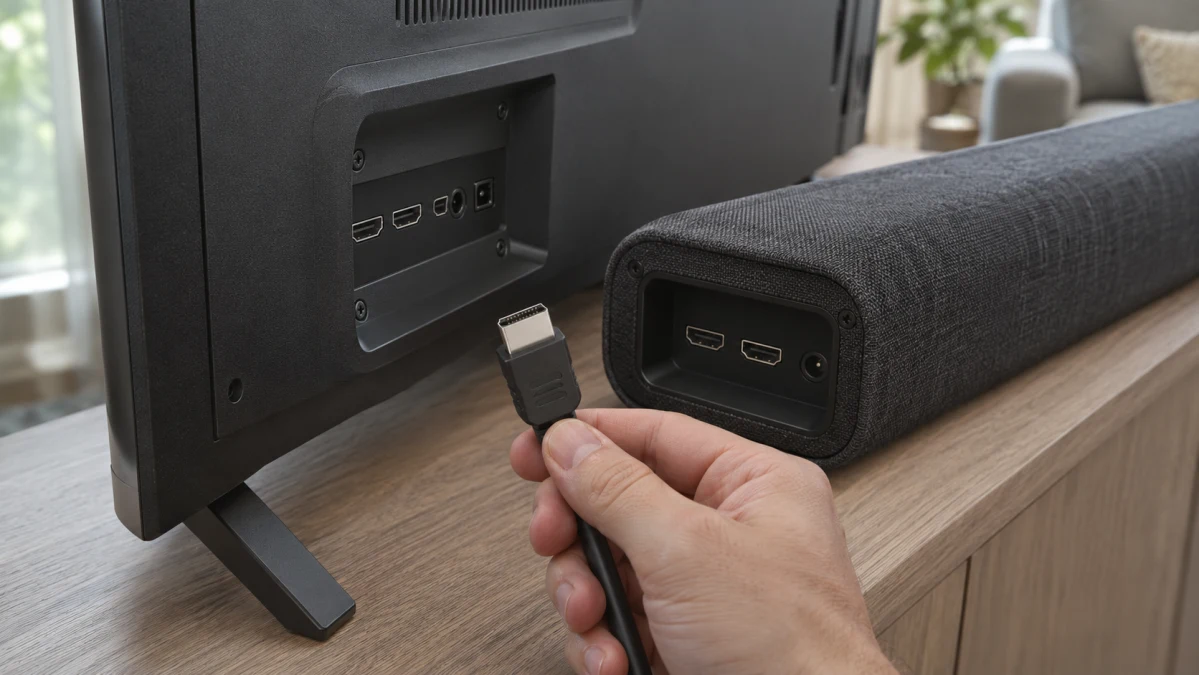
ARC stands for Audio Return Channel. It allows your TV to send audio back to a compatible soundbar through an HDMI cable. The port labels can be confusing: the TV's connection is typically labeled HDMI IN (ARC/eARC), while a soundbar's corresponding connection may be labeled HDMI OUT (ARC/eARC).
That doesn't mean you're connecting the devices backward. It's how the return-audio connection works.
HDMI ARC can carry common TV audio formats, including stereo PCM and Dolby Digital, when supported by both devices. eARC provides greater audio bandwidth and can carry higher-quality formats, including multichannel uncompressed PCM and lossless Dolby TrueHD, with compatible equipment.
The difference matters if you use a Blu-ray player, gaming console, or another source capable of delivering high-bandwidth surround sound. For ordinary TV viewing and many streaming services, regular ARC may already meet your needs.
There are a few catches:
- Both the television and soundbar must support the applicable ARC or eARC function.
- You need to use the correct HDMI ports, not just any available HDMI connection.
- The TV may require ARC/eARC and HDMI-CEC settings to be enabled.
- Audio-format support depends on the TV, soundbar, and playback source.
An eARC soundbar can often operate with an ARC-only television, but the connection won't gain eARC's additional bandwidth simply because the soundbar supports it.
Sony's TV-to-soundbar connection guide illustrates the different connection paths.
Optical Audio: A Useful Alternative
If your TV has an optical digital audio output, an optical connection may be a practical way to connect a compatible soundbar.
Optical can carry stereo PCM and certain compressed surround formats, depending on the equipment. It doesn't provide the bandwidth required for lossless multichannel formats such as Dolby TrueHD.
That doesn't automatically make optical sound bad. For regular television programming, news, and dialogue-heavy shows, a properly configured optical connection can be entirely satisfactory.
The bigger everyday compromise may be convenience. Optical doesn't carry HDMI-CEC control commands, so automatic power synchronization and TV-remote volume control aren't guaranteed. Some televisions and soundbars offer alternative control arrangements, but those need to be checked separately.
Also, don't assume a soundbar has optical input merely because it's marketed for TVs. Verify the actual ports.
AUX: Simple, but Check Both Ends
An analog AUX connection can be useful with older televisions, provided the TV has a suitable analog audio output and the soundbar has a corresponding input.
A 3.5 mm headphone jack on a TV may serve as an audio output, but a similarly shaped connector on another device isn't necessarily an input.
Analog connections also generally provide stereo rather than discrete digital surround sound. Volume behavior varies: some TVs allow headphone-output volume adjustment from the remote, while fixed-level analog outputs may require separate soundbar volume control.
For a basic TV setup, that's not necessarily a deal-breaker. Just establish how you'll control the sound before buying.
Sony BRAVIA Theater Bar 9: A Premium Option for Home Theater
The Sony HT-A9000 specifications describe a 13-speaker soundbar with one HDMI input and an HDMI output supporting eARC/ARC.
That HDMI arrangement gives you more flexibility than a soundbar that relies solely on a TV's audio return channel.
For example, a compatible external source can potentially connect directly to the soundbar's HDMI input, with video passed onward to the television. That can be useful when a TV doesn't support every audio format available from the source.
However, the video formats and passthrough capabilities still need to match your equipment. An HDMI input doesn't automatically guarantee support for every gaming resolution, refresh rate, or video feature.
What Its Audio Capabilities Mean in Practice
Sony lists support for formats including Dolby Digital, Dolby Digital Plus, Dolby TrueHD, Dolby Atmos, DTS formats, and LPCM through applicable connections.
That breadth matters most when you're building a system around movies, gaming, and higher-quality external sources.
Dolby Atmos support, for instance, gives the soundbar the ability to process compatible immersive audio. But seeing the Atmos logo doesn't guarantee that every movie will produce convincing overhead effects.
The result depends on the soundtrack, room layout, listening position, acoustic reflections, and speaker configuration. A single soundbar also shouldn't be assumed to reproduce the same spatial separation as a system with physically positioned surround and height speakers.
The Theater Bar 9 can be expanded with compatible optional Sony wireless speakers and subwoofers. Those are separate purchases, so the cost of a more complete home-theater setup can be considerably higher than the soundbar's advertised price.
For a buyer primarily watching news, sitcoms, and everyday television, that additional capability may be unnecessary. For someone investing in movies and immersive audio, it's a more meaningful advantage.
Setup and Everyday Control
Sony's HT-A9000/HT-A8000 help guide directs users to the Sony BRAVIA Connect smartphone app for setup and operation.
That's worth considering before purchase. If you prefer equipment that can be configured entirely with physical buttons and a conventional remote, an app-dependent setup may be less appealing.
Sony also lists HDMI-CEC support and an included soundbar remote. HDMI-CEC can allow compatible televisions and audio systems to coordinate functions such as power and volume control.
But HDMI-CEC support on both specification sheets isn't a guarantee that every function will behave identically across brands and models.
Check the television's HDMI-CEC implementation, the soundbar's Control for HDMI settings, and the exact functions supported by the combination.
Sony explains the relevant conditions in its HDMI control guidance.
SC-1423SB: Check the Basics Before Comparing Features
The SC-1423SB is advertised with HDMI ARC, AUX, and Bluetooth connectivity.
Those connections suggest potential ways to use it with a television, but they don't tell the whole story.
The first thing to establish is whether its HDMI ARC implementation supports the return-audio connection from your exact TV. You also need to know which audio formats the soundbar accepts and how its input is selected.
If you're considering AUX, verify that the soundbar provides an analog audio input compatible with your TV's output.
And if Bluetooth is the attraction, confirm that the soundbar can receive audio from your television rather than merely from a phone or tablet.
Without reliable, model-specific documentation for those details, it's premature to call the SC-1423SB compatible with a particular television.
The same caution applies to sound quality. A list of connection types doesn't establish how clearly a soundbar reproduces dialogue, how much bass it produces, or how it performs at low listening volumes.
Those questions require credible acoustic measurements, trustworthy listening evaluations, or a meaningful opportunity to audition the product.
Compare the Two Soundbar Options
13-channel soundbar with mount and surge protector
This bundle includes the Sony HT-A9000, a Walts TV soundbar mount, and an Amber Protection three-outlet surge protector.
The soundbar is the main attraction. Its documented HDMI eARC/ARC connectivity and broad audio-format support make it worth considering for a more ambitious home-theater setup.
The accessories deserve separate attention. A bundled mount isn't automatically suitable for your TV, wall installation, or preferred soundbar placement. Check the mounting hardware's compatibility, dimensions, weight limits, and installation requirements.
Likewise, a bundled surge protector shouldn't be treated as evidence of a particular level of electrical protection without checking its specifications.
If you don't need the accessories, compare the bundle price with the soundbar sold separately.
The SC-1423SB is worth investigating if you're looking for a straightforward TV-audio connection and its advertised ports match the connections available on your television.
Before purchasing, obtain the manufacturer's connection instructions and confirm the supported audio formats and control behavior.
For a simple installation, knowing that the TV and soundbar can exchange usable audio—and that volume control will work the way you expect—is more valuable than a long list of unexplained features.
Bluetooth Soundbars: Convenient, but Not Always Ideal for TV Audio
Bluetooth sounds like the easiest solution: pair the television with the soundbar and eliminate the audio cable.
Sometimes it really is that simple. But the Bluetooth label on a product doesn't establish that the devices can work together.
A soundbar may support Bluetooth audio from a smartphone without supporting every television's Bluetooth audio-output implementation.
Similarly, a TV may offer Bluetooth for headphones, remotes, or other accessories without supporting the particular soundbar connection you want.
To use Bluetooth for television audio, both devices need compatible audio-transmission and reception capabilities, along with a supported pairing procedure.
The Lip-Sync Problem
One practical concern with Bluetooth TV audio is latency—the delay between something happening on screen and the corresponding sound reaching your ears.
You may notice it most when watching dialogue. A person's lips move, but the words arrive slightly afterward.
Bluetooth delay depends on the devices, codecs, processing, and synchronization behavior. It shouldn't be assumed that every Bluetooth connection will have noticeable lag, or that a particular codec will solve it.
Wireless interference can also cause interruptions in some installations.
Sony's Bluetooth TV connection guidance describes pairing procedures for supported equipment and recommends investigating HDMI when Bluetooth audio experiences interruptions or synchronization problems. Its detailed examples cover particular Sony models, so they shouldn't be treated as confirmation of HT-A9000 compatibility with every Bluetooth-equipped TV.
For a permanent living-room installation, a documented HDMI ARC/eARC connection is generally the more attractive starting point, particularly when integrated control and multichannel audio matter.
Bluetooth remains useful for music playback and compatible TV setups where avoiding a cable is the priority.
Can You Control Everything With One Remote?
This is one of the easiest details to overlook while shopping.
You connect the soundbar, hear the TV perfectly, and then discover that changing the volume requires a second remote.
There are several ways TV and soundbar controls can interact, and they aren't interchangeable.
HDMI-CEC: With compatible equipment, HDMI-CEC can coordinate functions such as power and volume control over HDMI. Manufacturers use different names for their implementations; Sony calls its system BRAVIA Sync.
Optical or analog connections: These don't carry HDMI-CEC commands. Some systems support volume control through infrared learning, variable analog output, or other manufacturer-specific arrangements.
Bluetooth: Volume adjustment from the television remote depends on the capabilities and behavior of both connected devices. Bluetooth pairing alone doesn't guarantee it.
Before buying, decide whether you need TV-remote volume adjustment, synchronized power, automatic input switching, or all three.
Then check each function individually.
Even when a manufacturer documents support, real-world operation can depend on settings, firmware, and the connected equipment. A return policy can be valuable when cross-brand remote integration is an essential requirement.
Don't Forget the Room, the TV Stand, and the Total Cost
Connection compatibility is only part of choosing a soundbar.
A model can support every audio format you want and still be awkward to live with if it blocks your TV's infrared receiver, extends beyond your furniture, or sits in front of the bottom edge of the screen.
Before ordering, measure the available space and check the soundbar's actual dimensions.
For wall-mounted televisions, consider whether the soundbar will be mounted separately or attached using a compatible bracket. A mounting accessory included in a bundle may not work with your particular arrangement.
Placement also matters acoustically. Some immersive soundbars use reflections from walls and ceilings to create a broader sound field. Unusual room geometry, high or angled ceilings, and open-plan spaces can affect how convincing those effects are.
Finally, compare the full system cost rather than the soundbar price alone. Optional subwoofers, rear speakers, mounting hardware, and installation can change the value equation substantially.
How to Confirm Compatibility Before Ordering
You don't need to understand every HDMI specification to make a sensible purchase. You do need answers to a few specific questions.
- What is your exact TV model? Check the manufacturer label or the television's settings menu. Regional variants may have different capabilities.
- Which audio output will you use? Identify HDMI ARC/eARC, optical, or an appropriate analog output.
- Does the soundbar have the matching input or return-channel connection? Confirm this using the exact model's documentation.
- Can the connection carry a supported audio format? Check both devices and the source you intend to watch. If necessary, determine whether the TV can output a mutually supported format such as stereo PCM.
- How will you control volume and power? Verify the specific remote-control functions you care about rather than assuming audio compatibility includes them.
- Are there additional setup requirements? Check for app-based configuration, HDMI-CEC settings, input selection, or firmware requirements.
For the Sony HT-A9000, the manufacturer's published specifications provide a useful starting point for evaluating HDMI connectivity and audio formats. You still need to compare those capabilities with your television.
For the SC-1423SB, the advertised connections warrant further investigation, but detailed documentation is needed before recommending a specific TV pairing.
If you're unsure, the most useful question to ask a seller or manufacturer is precise: Will this exact soundbar model receive audio from my exact TV model through this specific connection, and can I adjust its volume using my TV remote?
A clear answer supported by documentation is much more useful than a generic assurance that the product works with televisions.
Which Soundbar Should You Choose?
The Sony BRAVIA Theater Bar 9 is the more compelling option to investigate if you want immersive movie audio, broad format support, HDMI connectivity for an external source, and the possibility of expanding your home-theater system later.
Its capabilities come with trade-offs: potentially substantial total cost, smartphone-based setup, and features that may be unnecessary for ordinary TV viewing.
The SC-1423SB may be worth considering for a simpler installation, but its advertised connectivity alone isn't enough to establish how it compares in sound quality, ease of use, or compatibility with your particular television.
Neither soundbar should be treated as a confirmed match without checking your TV model and intended connection.
The best purchase isn't necessarily the model with the longest feature list. It's the one that connects reliably to your television, handles the audio you actually watch, fits your room, and lets you control the experience without unnecessary hassle.