
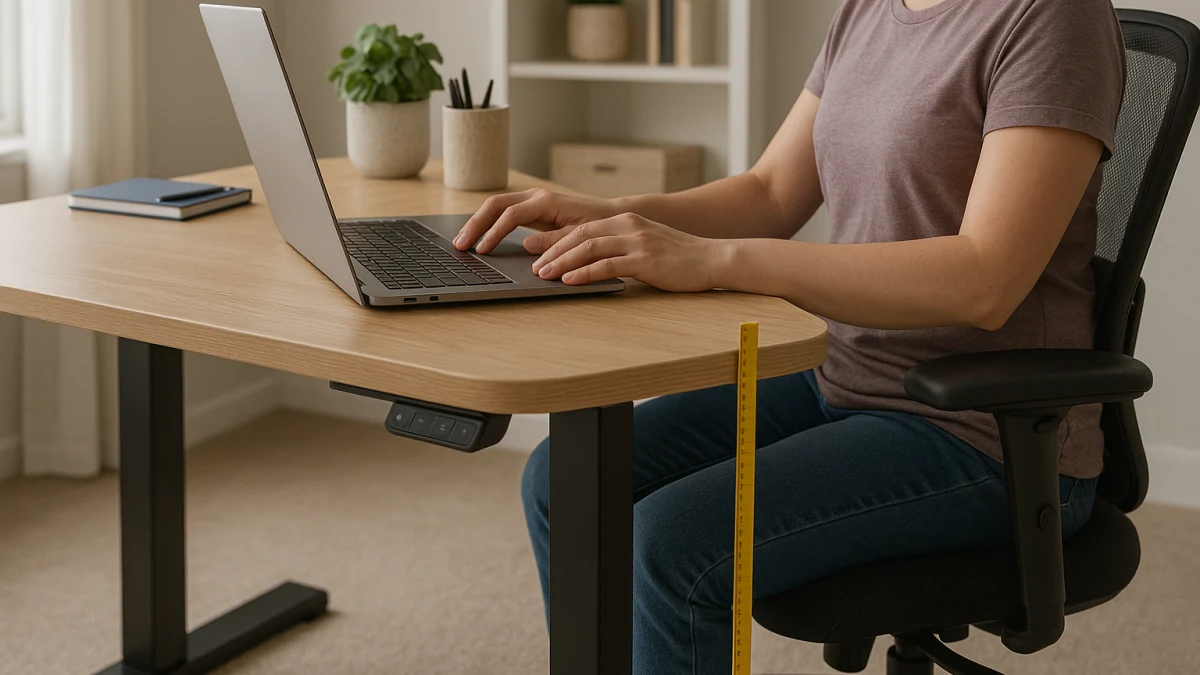
For shorter users, the standing-desk decision starts at the bottom of the height range. A desk can offer strong motors, multiple memory presets, a large desktop, and a tall standing position while still sitting too high for comfortable keyboard and mouse use.
Stature alone is not enough to predict fit. Body proportions, chair height, footwear, tabletop construction, and whether the published measurement refers to a complete desk or only the frame can all change the result. Use this collection as a fit screen: establish the seated keyboard-and-mouse height you need, then compare that target with the desk's lowest finished work-surface height.
Start with the lowest usable height
| If this is your situation | Better fit to compare first |
|---|---|
| Many desks remain above the keyboard-and-mouse height you need while seated. | Standing desk with a lower minimum height |
| The desk reaches both your seated and standing positions and you switch frequently. | Standing desk with programmable height presets |
| The desk reaches the required seated height, but the chair, armrests, or leg position still create a mismatch. | Adjustable smart chair as a secondary fit check |
| You specifically want a keyboard tray, footrest, standing-desk converter, or tall-user maximum-height guide. | Outside the main scope of this collection |
The order matters. First confirm the lowest usable work-surface height. Then verify your standing position, desktop dimensions, leg clearance, and stability through the range you expect to use. Only after those checks should presets and other convenience features influence the choice.
Establish your seated keyboard height before shopping
Do not simply copy the height of a desk you already use. If that desk is too high or too low, reproducing its measurement reproduces the same mismatch.
Instead, begin with your chair in a usable seated position. Your feet should be supported, your shoulders relaxed, and your upper arms able to stay close to your body. Position your forearms and hands for keyboard and mouse use without forcing your shoulders upward or your wrists into an awkward angle.
Then measure from the floor to the height where the keyboard and mouse surface needs to be. Use that as the comparison point for the desk.
This is a fit-screening measurement rather than a universal prescription. Two people of the same height can need different desk settings because their torso, arm, and leg proportions differ.
Compare like-for-like height measurements
A minimum-height number is useful only when you know exactly what it measures.
For a complete standing desk, check whether the manufacturer states the height to the top of the finished desktop. For a frame-only product, determine whether the published range ends at the frame or already accounts for a tabletop. Add tabletop thickness only when the manufacturer's measurement method requires it.
Also check:
- whether optional casters or wheels increase the installed height;
- whether the listed range changes with a particular frame or desktop configuration;
- whether adjustable feet are included in the stated minimum;
- whether enough leg and thigh clearance remains at the seated setting;
- whether the product page gives dimensions for the exact variant you are considering.
A low frame specification does not automatically equal the same finished keyboard height.
Maximum height is a separate test
A large adjustment range can be useful, but range width by itself does not tell you whether a desk fits.
For shorter users, first ask whether the desk lowers far enough for seated work. After that, confirm that it also rises to the standing position you need. A high maximum does not compensate for a minimum that leaves your keyboard and mouse too high while seated.
Common comparison mistakes include:
- sorting by the widest adjustment range instead of the lowest usable height;
- treating a tall maximum height as evidence of better overall fit;
- choosing a motor or controller before checking dimensions;
- assuming memory presets solve a height mismatch;
- comparing frame dimensions with finished-desk dimensions as though they were identical;
- raising the chair only to reach an overly high desk without checking what happens to foot support and the rest of the workstation.
Low-minimum-height desks come first
The first product group is for desks and frames that deserve inspection because of the lower end of their published adjustment range.
Do not use a single cutoff as a universal definition of a desk for shorter users. The useful threshold is the one that matches your measured setup after you account for how the manufacturer defines desk height.
Read these products from the bottom of the range upward. Check the minimum height first, then determine whether that number describes the finished work surface for the exact configuration shown.
After the minimum clears your seated-height test, compare desktop size, frame-versus-complete-desk format, leg clearance, mobility options, controls, and the standing end of the range. If the lowest installed surface is still above the height you need, move to another desk rather than letting presets, motor specifications, or extra features outweigh the mismatch.
Presets matter only after the range fits
Memory presets are useful when the desk already reaches your required positions. They reduce repeated adjustment; they do not expand the mechanical height range.
A preset-equipped desk becomes more interesting when:
- its lowest usable surface reaches your seated keyboard-and-mouse position;
- its upper range reaches the standing position you need;
- the exact controller supports enough saved positions for your routine;
- the manufacturer clearly states the adjustment range for the configuration you are buying;
- the desk remains practical through the heights you expect to use.
Two people sharing a desk may benefit from more saved positions than one person alternating between sitting and standing, but preset count should remain a secondary comparison.
Compare preset-equipped desks after fit is confirmed
This group broadens the search to standing desks with programmable controls. Some may have a higher minimum than products in the first group, so do not assume that a better controller means a better fit for a shorter user.
Check the exact controller rather than relying on generic phrases such as "memory function." Product pages may describe two, three, or four saved positions, programmable buttons, or one-touch recall differently.
The important sequence remains unchanged: verify the lowest finished surface, verify your standing setting, and then decide whether the available presets make switching positions easier.
A chair can be part of the fit equation
Desk and chair height interact. If a desk cannot lower to your preferred seated position, raising the chair may sometimes create a workable keyboard height, provided the rest of the setup is adjusted appropriately and your feet remain supported.
That is different from finding a desk that directly reaches the seated height you want. This collection keeps low-minimum-height desks as the primary path and uses chairs only as a secondary boundary check.
If the desk already reaches the required seated work-surface height but the workstation still feels mismatched, inspect the chair for:
- usable seat-height range;
- stable foot support at the chosen seat height;
- adequate thigh clearance under the desk;
- armrests that do not force the shoulders upward or prevent you from moving close enough to the desk;
- adjustable lumbar support where provided;
- tilt or recline adjustment;
- headrest adjustment where relevant.
Check the chair only after checking the desk
The smart-chair products below are most relevant when the desk's range has already passed your height test and seated adjustability is the remaining variable.
Do not treat a chair as proof that an unsuitable desk will become suitable. Raising the seat changes foot position, knee and hip position, armrest clearance, monitor alignment, and the relationship between your body and the work surface.
Likewise, skip this lane if you are actually shopping for massage chairs, recliners, gaming-focused seating, or another chair category unrelated to the workstation fit problem.
What this collection intentionally does not solve
This page focuses on choosing a standing desk that can reach an appropriate low setting without making accessories the main solution.
Standing-desk converters, keyboard trays, and footrests can be legitimate workstation components, but they create different buying paths. A keyboard tray can place the input devices below the main desktop, while a footrest can support the feet when the chair must be positioned higher. Neither changes the standing desk's actual minimum height.
If you specifically want one of those solutions, compare it on its own merits rather than treating it as another low-minimum-height desk.
Final fit check before choosing a desk
Before following a product link, verify the exact variant you are considering:
- Establish the seated keyboard-and-mouse height you need instead of relying only on your stature.
- Compare that target with the desk's lowest finished work-surface height.
- Check how the manufacturer defines its minimum-height measurement.
- For a frame-only option, account for the tabletop only when it is not already included in the stated measurement.
- Check whether casters, wheels, adjustable feet, or other configuration choices alter the installed height.
- Confirm enough thigh and leg clearance at the seated setting.
- Verify that the desk also reaches the standing height you need.
- Check desktop dimensions and the space required for your monitor, keyboard, mouse, and other equipment.
- Evaluate presets only after the mechanical height range fits.
- If the desk fits but the seated setup still does not, then compare chair height, armrest clearance, foot support, and other chair adjustments.
- Recheck the partner or manufacturer product page for current dimensions, included parts, and configuration-specific specifications before purchase.
Use ergonomic guidance as context, not a product guarantee
Workstation fit is about the relationship between the user, chair, desk, keyboard, mouse, monitor, and task rather than a single "ideal desk height." General ergonomic guidance favors a keyboard position that lets the shoulders remain relaxed, the elbows stay close to the body, and the hands and wrists remain in a neutral working position. Foot support and the rest of the workstation also need to remain compatible with the chosen chair and desk heights.
This collection uses those principles only as a shopping framework. It does not claim that a particular desk height will prevent pain, injury, or another medical problem.
The practical buying rule is simpler: establish the keyboard-and-mouse height your setup requires, verify the desk's lowest installed work-surface height, and only then compare presets, smart controls, and chair adjustability.