
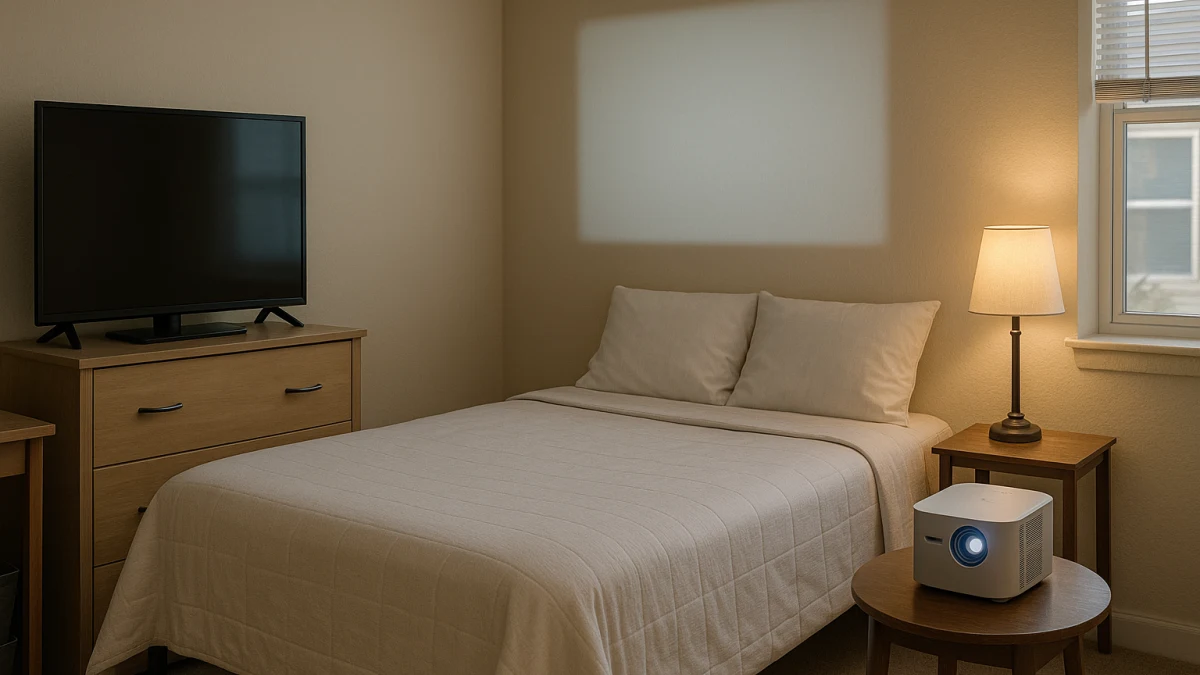
A small bedroom or dorm-style room changes the display decision. A compact smart TV and a portable smart projector are not just different versions of the same screen: the TV is usually the lower-friction daily option, while the projector is more conditional and depends on dimmer light, open wall space, placement, focus, and throw distance.
This page is meant to do what a normal smart TV or projector listing cannot: compare the room behavior before the product list. Use it to decide whether 24-inch, 32-inch, 40-inch, or 43-inch smart TV sizes make more sense for everyday streaming, whether a portable or mini projector is worth the setup for occasional movie nights, and whether short-throw wording is only a placement exception for a shallow room.
Three signals decide this room before brand or price
| If your main need is... | Better fit |
|---|---|
| Daily streaming, casual TV watching, shared-room viewing, and less resetting before each session | Compact smart TV |
| A larger occasional movie-night image, easy storage, and a room that can be dimmed | Portable smart projector |
| A projected image is still preferred, but the room is too shallow for placing a projector farther back | Short-throw smart projector for tight placement |
| Throw distance, fan noise, brightness, power, dimensions, or housing limits cannot be verified | Pause and confirm manufacturer details or applicable housing guidance before buying |
Before comparing models, compare the room: setup friction, room lighting, screen size versus viewing distance, storage and movement, app and input convenience, fan noise in a shared space, and any lease or housing limits that could affect placement.
Always-ready screen or dim-room movie image?
Choose the compact smart TV path when you want a screen that can sit on furniture and be used repeatedly without refocusing or realigning an image. The products in this lane are useful when daily streaming, visible smart platforms, remote controls, HDMI inputs, Wi-Fi, and built-in apps matter more than making the image as large as possible.
Choose the portable projector path when the priority is a larger image that can be stored between uses. That tradeoff is less automatic: the room usually needs to be dimmable, the wall or screen area needs to be open, and the projector position, focus, ports, app support, fan noise, and throw distance all deserve a closer look.
Out of scope: monitors, drilled mounts, and dorm-rule answers
This collection compares compact smart TVs and smart projectors only. It is not a computer monitor guide, tablet or laptop recommendation, speaker or headphone guide, gaming-console setup guide, or a projector-screen installation plan.
It also does not answer whether a specific item is approved for a dorm, lease, rental, wall mount, drilled installation, or electrical setup. If those rules matter where you live, check the applicable housing guidance before treating any display as safe to place, mount, or plug in.
Compact smart TVs: the low-reset option for daily viewing
A small smart TV is the baseline choice if you want something that just works most days. The products shown here include compact-room screen sizes such as 24-inch, 32-inch, 40-inch, and 43-inch options, which are more realistic for bedrooms and dorm-style rooms than large living-room sets.
This lane is strongest when app convenience and repeatable placement matter. Depending on the model, product pages may mention Android TV-style systems, Google TV, VIZIO Home, voice assistant support, Chromecast, AirPlay, Wi-Fi, HDMI, and built-in apps. Those details help you compare how the TV will actually be used: streaming from apps, connecting a device by HDMI, or casting from a phone.
Read these as everyday-viewing options, not as a ranked list of the only small TVs worth buying. A 24-inch portable TV-style model may be useful if you want movement or battery-oriented features, but it should not be treated as proof that every tabletop TV behaves the same way. If the room can hold a stable screen and you do not want to manage wall space, focus, and dim lighting, stay in this lane before jumping to a projector.
TV looked too fixed? Check the projector realities next
A compact TV still takes a permanent furniture spot, so it can feel too fixed for a tight room. Before switching to a projector, measure what changes: the wall area available for the image, where the projector could sit, whether people will walk through the light path, and whether the room can be dimmed when you actually watch.
Also compare the TV footprint against the projector setup footprint. A TV asks for stand width, furniture depth, outlet access, and viewing distance. A projector may store more easily, but it adds placement, focus, alignment, and throw-distance checks.
Portable smart projectors: the storable choice for dim-room movie nights
Portable, mini, compact, Portable Size, and backpack-style language points to the main reason to consider this lane: you want the display to disappear when not in use, or you want a bigger movie-night image without dedicating furniture space to a TV. That can be a good fit for a small bedroom if the room can get dark enough and you have a usable wall or screen area.
Do not read every projector title as the same feature bundle. Some product pages may show HDMI, USB, mirroring, HD, 1080p, or 4K-support claims, but those do not all mean the same thing, and they do not guarantee built-in streaming apps. Check each model for Wi-Fi, Bluetooth, app support, operating system details, ports, brightness claims, dimensions, weight, and power needs before assuming it will replace a TV.
Use these products to compare storage and setup tradeoffs. A model described as portable may still be too loud, too dim for your room, awkward to place, or dependent on an external streaming source. If you want quick daily viewing in mixed light, the compact TV lane is usually the safer starting point; if you want a larger occasional image and can manage the setup, this lane is the one to inspect closely.
Use short-throw only when room depth blocks the projector plan
Short-throw and UST wording can sound like the automatic small-room answer, but it should be treated as a narrower fix. Consider it when you still want projection and the problem is specifically that a regular portable projector cannot sit far enough back.
If a standard portable projector can be placed at a workable distance, short-throw is not automatically better. It may still require a suitable wall surface, app checks, brightness checks, noise tolerance, and manufacturer placement details.
Short-throw projectors: a placement escape hatch, not the default
This is the exception lane. Look for terms such as Short Throw Function, UST, 0.33 DMD UST, 0.9:1 throw ratio, and recommended distance when room depth is the blocker. Keep those terms as prompts to verify placement, not as a promise that a specific image size will work in your room.
Read this widget only after deciding that ordinary projector placement is the problem. Wi-Fi, Bluetooth, HDMI, USB, built-in apps, mini size, portable size, weight, and dimensions still vary by model, and short-throw wording does not automatically solve brightness, wall texture, fan noise, shared-room privacy, or housing restrictions.
Verify the small-room facts the listing cannot decide
Before buying, check the facts that depend on your room and the exact model:
- For compact smart TVs: screen size, overall dimensions, stand footprint, weight, furniture depth, outlet location, HDMI needs, Wi-Fi, app platform, casting support, voltage, and wattage.
- For portable projectors: throw distance, recommended distance, image size range, wall or screen area, focus controls, brightness wording, fan-noise information, dimensions, weight, power needs, HDMI, USB, mirroring, Wi-Fi, Bluetooth, and whether apps are built in.
- For short-throw projectors: throw ratio, recommended distance, image size range, projector height and placement, wall surface, dimensions, ports, app support, and whether the short-throw feature is clearly stated by the manufacturer.
- For shared rooms: where sound and fan noise will be noticed, whether lights need to stay on, and whether the setup has to be moved often.
Specs and housing limits need outside confirmation
Manufacturer sources are the right place to confirm dimensions, weight, fan noise, power consumption, brightness type, throw distance, recommended distance, and image-size claims. Product titles and short descriptions can help you shortlist, but they are not enough for exact room-fit promises.
Housing rules are separate from product features. Do not assume any TV or projector is approved for a dorm, lease, rental unit, drilling, wall mounting, extension-cord use, or a specific electrical arrangement. If those limits matter, confirm them through the applicable housing or lease guidance before buying.
The cleanest choice is the one that matches your routine: pick the compact smart TV if daily low-effort viewing wins, pick the portable smart projector if dim-room movie size and storage win, and only consider short-throw after room depth and manufacturer placement details have been checked.