
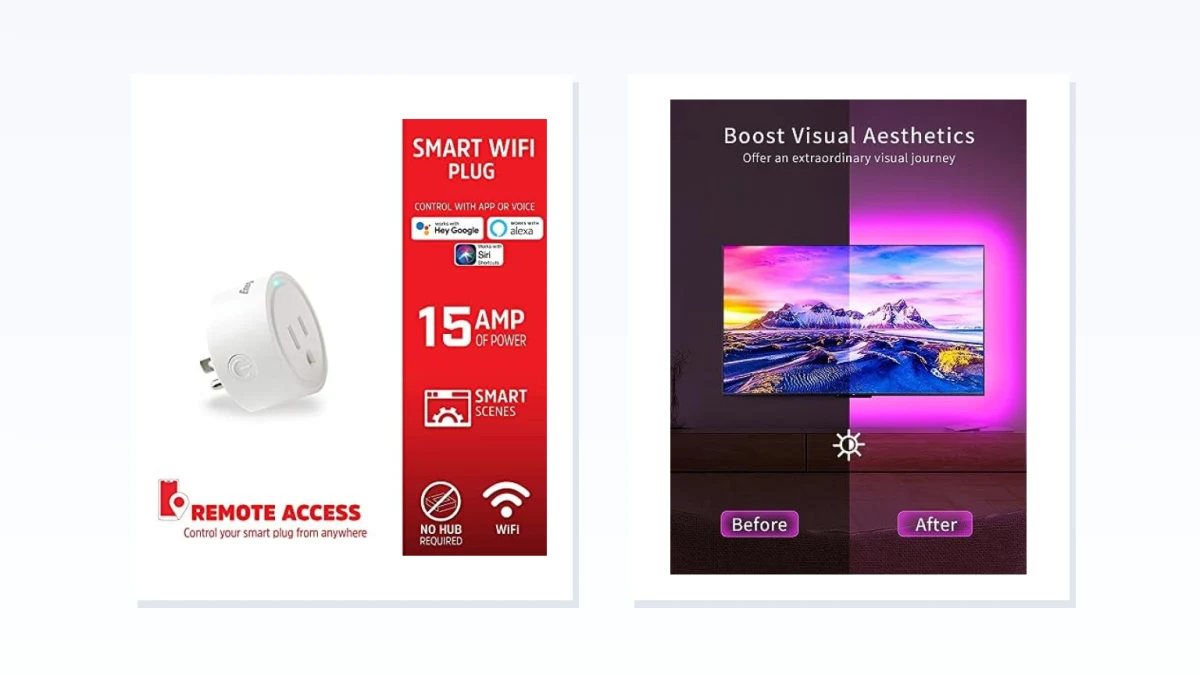
A smart plug can only switch an existing LED strip on or off. This guide separates that on/off-only path from a smart LED strip upgrade for color, dimming, and scenes, so you do not buy a plug expecting it to change strip color.
An existing non-smart LED strip creates a two-way decision: keep the strip and add a smart plug for on/off schedules and voice control, or replace it or add a controller for app-controlled color, brightness, scenes, and effects. The plug path costs less but does not change what the strip already does. The smart strip path adds that control but brings retrofit checks around voltage, pin count, length, and power supply. Four trade-offs shape the choice: control depth, keep versus replace, retrofit compatibility, and cost/setup effort versus how many features you actually need.
Smart Plug or Smart LED Strip: Fast Decision for an Existing Strip
| What you need | Better fit |
|---|---|
| Only on/off schedules, timers, voice control, or away automation, and the current strip already has acceptable brightness and color. | Smart plug on an existing LED strip |
| App or voice control over color, brightness, scenes, music sync, or dynamic effects that a smart plug cannot provide. | Smart LED strip light replacement or add-on controller |
| The existing strip's power supply load rating and power-cycle state are unknown. | Check manufacturer specifications for the plug and strip before choosing either path |
This Guide Compares Two Upgrade Paths, Not Whole-Room Smart Lighting
This page compares two focused paths: adding a plug-in smart plug or smart outlet to an existing non-smart LED strip, or moving to a smart LED strip or add-on controller for color and scene control. Hardwired under-cabinet lights, in-wall dimmers, and smart bulbs for lamps or fixtures are outside this decision. Add-on controllers are treated as a supporting option inside the smart LED strip lane, not as a separate co-equal buying guide.
When a Smart Plug Will Not Do the Job
A smart plug controls the outlet, not the light output. It can add app scheduling, timers, voice control, and remote on/off through the strip's existing power supply, but it cannot dim, change color, trigger scenes, or run music sync on an existing strip. There is also no universal guarantee that every strip powers back into the desired state after power is cut and restored. If the strip starts in a default or standby mode, scheduled power only guarantees scheduled power, not the look you wanted. If any of those missing features is the actual goal, skip the plug path and move to the smart LED strip lane.
Smart Plug Path: On/Off Control Only for an Existing LED Strip
This is the keep-the-strip path. If the current strip already has acceptable brightness, color, and mounting, a smart plug or smart outlet adds the missing part: app scheduling, timers, voice control, and remote on/off through the strip's existing power supply. The products shown here are plug-in Wi-Fi or Matter smart plugs and smart outlets, often in single or multi-pack sets; many are rated around 15A where the listing states it, and many models do not require a hub. Where a product card shows an ETL/FCC listing, that is still not a substitute for checking load rating and power-cycle compatibility.
Compare these products only on the duties a plug can actually perform: on/off switching, scheduling, timer control, voice and app access, and away automation. None of them should be read as a route to dimming, color, scene changes, or music sync. A plug changes when power is available; it cannot change what the strip itself does. If that limitation is the real problem, stop here and move to the color and scene path below.
Verify Power Supply Load and Power-Cycle State Before Buying a Smart Plug
Before relying on a smart plug, confirm two details on the plug product page and the strip manufacturer documentation: the plug's load rating against the strip's power supply, and how the strip behaves after power is removed and restored. Some strips return to the last state, while others start in a default or standby mode. Do not assume any smart plug matches any LED strip power supply, and do not treat this path as a dimmer or color controller.
Smart LED Strip or Add-On Controller Path: Color, Dimming, Scenes, and Setup
This lane covers the case where on/off control is not enough. The products shown include smart RGB or RGBIC LED strip kits and add-on strip controllers that bring app, Bluetooth, Wi-Fi, Matter, or voice control; product pages in this group commonly list 16-million-color modes, brightness or dimming, music sync, timers, and scene modes. The meaningful difference from the plug path is that these products control the light output itself, not just the outlet.
An add-on controller may let you keep the current strip if its voltage, pin count, and power supply match, but that is a supporting retrofit option rather than a guaranteed drop-in fix. A full replacement smart strip must be matched to the measured run length, mounting surface, and any cutting or reconnection needs of the current installation.
Use the widget to compare the controller path against full kits on the actual gap you are trying to close. If the strip itself is fine and only the control hardware is missing, look closely at controllers and verify connector compatibility before buying. If the strip is old, dull, too short, or mounted awkwardly, a replacement kit may be the cleaner route. The better choice is not simply the one with more features than a plug; it is the one whose color, dimming, scene, and sync capabilities match how you actually want the strip to behave.
Retrofit Checks: Voltage, Pin Count, Length, and Power Supply
Before committing to the smart strip or add-on controller path, verify the retrofit details that a product card alone cannot confirm for your installation.
- Confirm the existing strip's voltage and connector pin count match the controller or replacement strip before ordering.
- Measure the actual run length and compare it with the strip length, cut points, and reconnection options on the product page.
- Check the power supply output against the total strip load; if you plan to reuse an existing power supply, confirm its rating covers the new strip.
- If keeping the strip with a smart plug is the fallback, confirm its power-cycle behavior returns it to the intended state.
- Review the mounting surface and whether the new strip's adhesive backing or clips fit the space; a replacement is not guaranteed to match the existing install.
If on/off schedules, voice control, and away automation are enough, verify the smart plug's load and the strip's power-cycle state and keep the existing strip. If color, brightness, scenes, music sync, or dynamic effects are required, move to a smart LED strip or add-on controller only after the voltage, pin count, length, and power supply checks are settled first.