
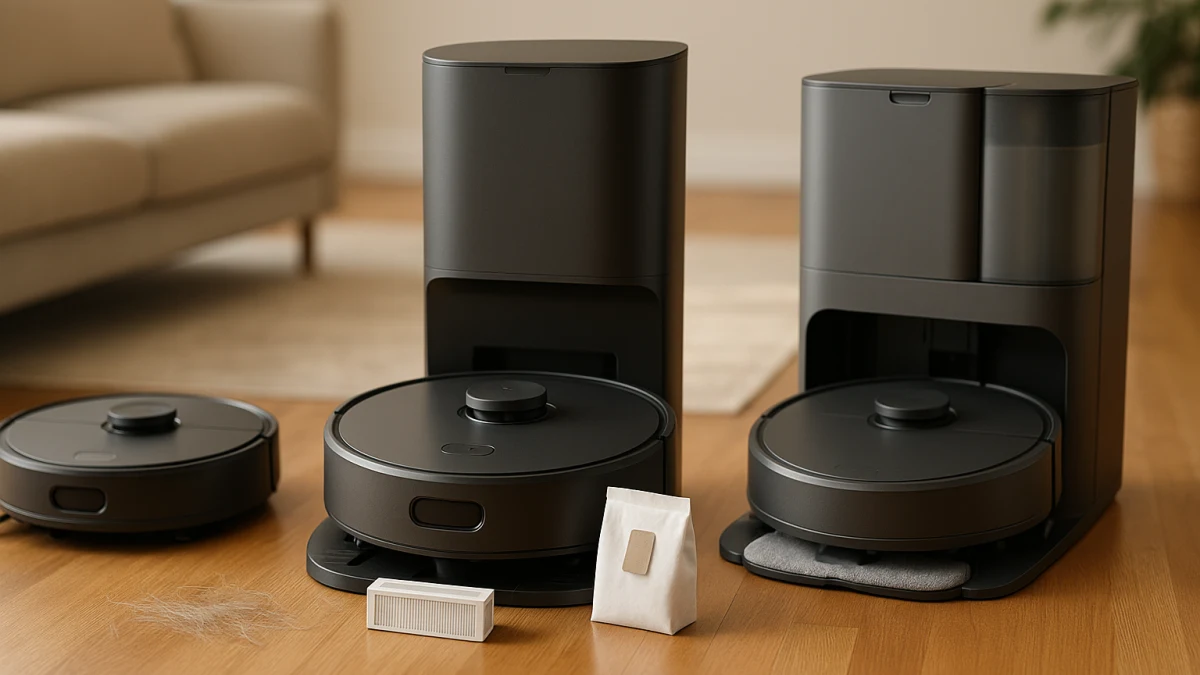
Self-emptying robot vacuums are not just regular robot vacuums with a nicer charger. The real purchase decision is whether you want debris moved from the robot into a dock often enough to accept the ownership tradeoffs: a larger base, a brief emptying cycle, bags or a bagless base, filters, and a different way of handling dust.
A normal robot vacuum listing can blur self-charging, auto-docking, auto-emptying, and all-in-one mop station language. Use this page as a compare-first guide: auto-empty for less onboard bin handling, standard robot vacuums for a simpler setup, and full-service mop docks only if mop washing or drying is part of the chore you are trying to solve.
Dock-or-no-dock signals before you browse
| If this sounds like your priority | Better fit |
|---|---|
| You want the robot to move debris into a dock and reduce how often you open the onboard bin. | Robot vacuums with auto-empty docks |
| You prefer a smaller charging setup and are comfortable emptying the onboard dustbin yourself. | Standard robot vacuums without auto-empty docks |
| Pet hair, frequent cleaning schedules, or dislike of dustbin handling are the main pain points. | Robot vacuums with auto-empty docks |
| Avoiding dock bags, a dust bag dock, or a larger base matters more than hands-free emptying. | Standard robot vacuums without auto-empty docks |
| You are mainly attracted by mop washing, hot air drying, self-refilling, or all-in-one station language. | Full-service mop docks with washing or drying features as a boundary check |
Before you compare product cards, separate the dock questions from the rest of the robot vacuum spec sheet. First, does the dock actually transfer debris, or does it only charge the robot? Second, where will the base sit, and are you comfortable with the footprint? Third, are you choosing disposable dust bags, a bagless self-empty base, or manual onboard bin emptying? Finally, keep current USD pricing, replacement consumables, filters, and any model-specific noise claims as checkout checks rather than assumptions.
Claims to verify on the model page, not in the lane
Some product wording is helpful for sorting, but not enough to treat as a guarantee. Check the product page or manufacturer information for:
- Whether the dock is truly an Auto-Emptying Dock, Self-Empty Base, Auto Empty Station, Clean Station, or similar debris-transfer system.
- Dust bag capacity and any 30-, 60-, 100-, or 120-day language. Treat those as capacity claims, not guaranteed real-world intervals for every household.
- Bagged versus bagless dock design, including how the base is emptied and what replacement parts are available.
- Filter type, filter replacement availability, and included accessories.
- Dock dimensions, clearance, and placement requirements.
- Emptying noise or dB claims, which are model-specific.
- Current US price, bundle differences, replacement bag availability, and ongoing consumable costs.
Auto-empty robot vacuums when the bin is the chore you want to avoid
This is the main upgrade path if the annoying part of robot vacuum ownership is opening the small onboard bin. Look for clear dock wording such as Auto-Emptying Dock, Self-Empty Base, Auto Empty Station, Clean Station, dust bag capacity, bagless self-empty base, or hands-free dust collection. Those terms are stronger buying signals than ordinary self-charging language.
Auto-emptying is most useful when the robot runs often, pet hair fills the bin quickly, or you dislike direct dustbin handling. The tradeoff is that the chore does not disappear; it moves to the dock. Some products use dust bags, some use bagless self-empty bases, and filter or brush maintenance can still matter.
Read these products by inspecting the dock first, then the robot. If the card mentions a long hands-free interval or dust bag capacity, verify the exact claim on the model page. If the base is bagless, check how it empties and what filters need attention. If you mainly want a compact charger and do not mind emptying the robot yourself, the standard robot vacuum lane is the cleaner comparison.
The chore shifts from the robot bin to the dock
An auto-empty dock reduces how often you open the robot’s onboard dustbin, but it can add other tasks. A bagged dock means checking compatible replacement bags and how full they get in your household. A bagless base avoids dock bags but still needs a way to empty collected debris, and that can change the dust-handling experience.
Also think about where the base will live. A self-empty base or all-in-one station may need more room than a basic charger, and the emptying process may create a short noise burst after cleaning. If noise timing, dock footprint, or exact capacity matters, treat those as model-page checks rather than category-wide promises.
Standard robot vacuums when a simple charging dock is enough
Choose this path when ordinary charging, self-charging, or auto-docking solves the automation you actually need. In this lane, the robot can return to its charger, but debris stays in the onboard dustbin until you empty it.
That makes the inspection points different. Compare onboard dustbin capacity, filters, runtime, navigation terms such as LiDAR or sensor navigation, app or voice control, and included charging accessories. Those features can matter, but they should not distract from the central tradeoff: smaller and simpler setup versus manual bin emptying.
Use these products if you want to avoid a dust bag dock, keep the charging area simpler, or skip the larger self-empty base. Do not assume every standard robot vacuum is cheaper or quieter; compare current pricing and product-page noise claims if those matter. The key compromise is dust exposure during manual bin emptying, so this lane is best when you are comfortable doing that chore yourself.
Stop here unless you also want mop-pad maintenance
Mop-dock language can make a product sound like the obvious premium version of self-emptying, but it is a different ownership decision. All-in-one stations, mop washing, hot water mop washing, hot air drying, self-refilling, auto-mop cleaning and drying, and self-cleaning mop systems add wet-maintenance questions on top of dust collection.
If your real problem is only vacuum-bin emptying, do not let mop-pad features pull you into a larger system by default. Move into the next section only if you actually want the dock to handle mop pads, water tanks, or related cleaning steps.
Full-service mop docks if the question has moved beyond emptying dust
This is a boundary check, not a co-equal recommendation set for every self-emptying shopper. These products combine robot vacuuming with broader dock maintenance such as all-in-one stations, PowerDock-style maintenance, mop washing, drying, self-refilling, or self-cleaning mop systems.
Read this section as a sign that you may be shopping for a robot vacuum-and-mop dock rather than a self-emptying vacuum dock. Check water tanks, mop pads, cleaning solution needs, dust bags, dock height, and placement. Do not treat hot water washing, hot air drying, or self-refilling as automatic upgrades unless those wet-maintenance features solve a real problem for your home.
Checkout checks for bags, bin access, and base placement
Before choosing, confirm the details that change daily ownership:
- The dock wording: self-charging and auto-docking are not the same as auto-emptying.
- Bagged or bagless design: if bagged, check compatible replacement bags; if bagless, check how the base is emptied.
- Dust bag capacity or hands-free interval claims: verify the model-specific wording and do not treat it as a universal household interval.
- Filter type and replacement availability for the robot and, where relevant, the dock.
- Onboard bin access, especially if you are choosing a standard robot vacuum.
- Dock placement, clearance, and manufacturer dimensions for the spot where the base will sit.
- Emptying noise controls or scheduling options if the dock will be near bedrooms, work areas, or shared living space.
- Included accessories such as charging base, dust bags, filters, mop pads, or water tanks.
- Current USD price, bundle contents, and replacement consumables before checkout.
Choose the smallest system that solves the actual chore. Pick an auto-empty dock for less bin handling, a standard robot vacuum for a simpler setup, or a full-service mop dock only when mop maintenance is part of the need.