
Solar Panels or an Expansion Battery? Choosing the Right Anker SOLIX Power Station Bundle
A portable power station can keep your refrigerator running during an outage, power equipment at a campsite, or provide electricity where there isn't an outlet. But the accessories bundled with it can make a bigger difference than you might expect.
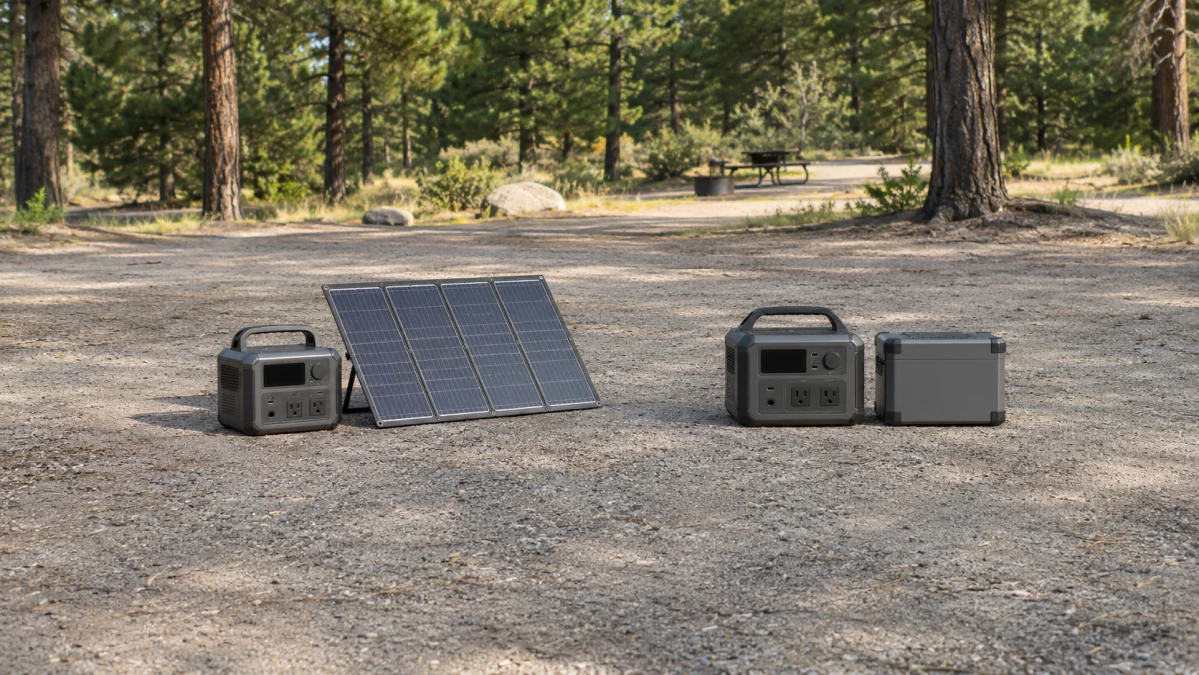
Consider two Anker SOLIX packages: a C1000 Gen 2 paired with a 400W solar panel, and an F3000 paired with an expansion battery. Both provide portable stored electricity, but they solve different problems.
The solar bundle helps you replace energy you've used. The expansion-battery bundle gives you more energy to use before you need to recharge.
There's another important distinction: these packages contain very different power stations. The F3000 has substantially more storage and higher output capability even before its expansion battery is connected. The C1000 Gen 2 is much easier to carry, but its battery capacity cannot be expanded.
Here's how those differences affect what you can actually power, how long it might run, and how much equipment you'll have to move.
The biggest difference: Recharging versus longer runtime
Imagine spending a weekend at a sunny campsite. You use your power station overnight to charge phones, run lights, and power a small refrigerator. During the day, you unfold a solar panel and replenish some of the energy you've consumed.
That's the appeal of the C1000 Gen 2 solar bundle. With enough sunlight, a properly connected panel can keep adding energy during your stay.
Now imagine a power outage lasting through a cloudy night and into the following day. You have no reliable solar collection, and you can't recharge from the grid. What matters most is how much energy you stored before the outage.
That's where the F3000 expansion-battery package has an advantage. An additional charged battery increases the energy available between charging opportunities.
Neither approach is universally better. Solar depends on conditions you can't control, while extra batteries eventually run empty. And a large battery won't help if the station's outlets can't supply the power your appliance requires.
Anker SOLIX C1000 Gen 2 with 400W solar panel: Better for portable, renewable charging
The Portable power station and solar panel bundle pairs the Anker SOLIX C1000 Gen 2 with a 400W solar panel.
The C1000 Gen 2 provides 1,024Wh of nominal battery capacity and 2,000W of rated AC output, with a manufacturer-specified 3,000W peak. At 24.9 pounds for the station alone, it's reasonably manageable for moving between your home, vehicle, and campsite.
The included panel changes how you can replenish that battery, not how much electricity the battery holds.
What a 400W panel actually gets you
A 400W solar panel doesn't deliver 400W continuously whenever the sun is up. Its rating reflects output under standardized test conditions. Actual collection depends on sunlight intensity, panel angle, temperature, shading, and charging losses.
For perspective, suppose a panel averaged 250W of actual charging input for three hours. That would amount to approximately 750Wh of incoming energy before accounting for battery-charging losses and other system behavior.
That's a hypothetical example, not a predicted output for this particular panel. But it illustrates why a few productive hours of sunshine can be valuable when your daily electricity consumption is modest.
A phone, laptop, lights, and other relatively low-power devices are easier to support with intermittent solar replenishment than an electric heater or a continuously running high-wattage appliance.
Anker rates the C1000 Gen 2 for up to 600W of solar input and advertises a full solar recharge in approximately 1.8 hours under its specified 600W conditions. That charging-time claim does not apply to a single 400W panel. Real-world charging may take substantially longer.
You can check the station's published specifications on Anker's C1000 Gen 2 product page.
Where this bundle makes sense
The C1000 Gen 2 solar configuration is particularly appealing for camping, outdoor work, and temporary off-grid use when you can set up the panel in unobstructed sunlight.
It's also easier to move around than the much larger F3000 system. That matters when you're lifting equipment into a car, carrying it to a campsite, or storing it in a small apartment.
The trade-off is that you need space to deploy the panel, and you may need to reposition it as sunlight changes. A panel left folded in the trunk provides no replenishment.
Solar is also less dependable during heavy cloud cover, in deep shade, or when you're primarily consuming electricity at night. You still need enough stored energy to get through those periods.
The limitation you can't upgrade away
The C1000 Gen 2 has a fixed 1,024Wh battery.
Unlike the original C1000, the C1000 Gen 2 does not support an expansion battery, as Anker confirms in its product specifications.
That distinction matters if you expect your electricity needs to grow. You can recharge the C1000 Gen 2 from compatible solar equipment or other supported sources, but you cannot attach an expansion battery to increase its built-in storage.
If you're buying primarily for multi-day emergency backup without dependable recharging, that fixed capacity deserves serious consideration.
Anker SOLIX F3000 with expansion battery: Better for substantial backup storage
The Power Station Bundle with Expansion Battery takes a different approach.
The BetterPowered F3000 listing identifies a package containing one Anker SOLIX F3000 power station and one F3000 expansion battery.
The F3000 itself provides 3,072Wh of nominal capacity—three times the C1000 Gen 2's storage before any additional battery is connected.
Anker's compatible BP3000 expansion battery is also rated at 3,072Wh. If the included battery is confirmed to be a BP3000, the combined system would provide 6,144Wh of nominal storage.
The seller's package description does not conclusively identify the included expansion battery as a BP3000, so verify the exact model and required connection cable before purchasing.
What that extra storage means at home
The advantage becomes clearer when you consider appliances that must operate for many hours.
A refrigerator may draw relatively little power while its compressor is off, then considerably more while running. Its total daily consumption depends on the appliance, ambient temperature, door openings, and compressor cycling.
Extra battery capacity gives you more room to accommodate that unpredictable pattern, along with other essential loads.
The same applies to a home internet setup, medical equipment, fans, or a small collection of devices you need during an outage.
You don't have to position panels outdoors or depend on clear skies to use energy already stored in the batteries.
But you do need to charge the system beforehand. Once the batteries are depleted, the additional capacity provides no further benefit until you reconnect a charging source.
How long could it run your devices?
Battery capacity gives you a starting point for estimating runtime, but it isn't the same as usable electricity delivered through an AC outlet.
For a simplified illustration, assume the F3000 is connected to one confirmed BP3000, giving it 6,144Wh of nominal storage.
| Average electrical load | Idealized runtime before losses |
|---|---|
| 50W | About 123 hours |
| 100W | About 61 hours |
| 200W | About 31 hours |
| 500W | About 12 hours |
These figures are simply nominal capacity divided by average power consumption. They're not tested runtimes or performance guarantees.
Actual results will be shorter because of inverter losses, the station's own power consumption, battery-management behavior, and other factors. The difference can be particularly noticeable with small AC loads running for extended periods.
For a refrigerator or another cycling appliance, use measured energy consumption over time rather than its maximum wattage to estimate runtime.
The practical point is that an expansion battery can extend operation considerably without changing how much power the inverter can deliver at any instant.
A system designed to grow
According to the F3000 operating manual, the station supports up to three compatible BP3000 expansion batteries.
With three connected, nominal capacity reaches 12,288Wh.
That's the maximum supported storage configuration described in the manual, not what arrives in a package containing just one expansion battery.
This flexibility is useful if you expect to increase your backup capacity later. It also means you can start with a smaller configuration instead of purchasing every battery immediately.
Don't overlook the difference in AC power
Battery capacity determines how much energy is available. Inverter output determines which appliances you can run.
Confusing the two can lead to an expensive purchase that doesn't solve your problem.
Here are the key US specifications for the base stations:
| Specification | C1000 Gen 2 | F3000 |
|---|---|---|
| Base battery capacity | 1,024Wh | 3,072Wh |
| Battery expansion | Not supported | Up to three BP3000 batteries |
| AC output | 2,000W rated | Up to 3,600W through the specified TT-30R output |
| Advertised peak/surge | 3,000W peak | 7,200W surge |
| US AC voltage | 120V | 120V in the single-station configuration |
| Base station weight | 24.9 lb | 91.5 lb |
The F3000's published outlet specifications require some care. Its TT-30R output is rated for up to 3,600W, while its NEMA 5-20R outlets have a separate 2,400W maximum specification. You should not assume every individual receptacle can deliver the station's highest advertised output.
Similarly, a surge rating describes short-duration capability, not the amount of power an appliance can draw continuously.
Why outlet type matters
Suppose you want to run a high-demand appliance. Knowing that the F3000 advertises 3,600W output isn't enough.
You need to know whether the appliance uses a compatible plug, whether its continuous draw is within the relevant outlet rating, and whether its startup demand is supported.
The F3000's TT-30R outlet, for example, is not interchangeable with an ordinary household receptacle simply because both provide 120V power.
The expansion battery doesn't increase the output rating of the base station. It supplies more energy for the existing system to use.
There's also an important limitation for home backup: a single F3000 with an expansion battery is not a 240V system.
Anker documents a separate 7,200W/240V arrangement requiring two F3000 power stations and a Double Voltage Hub. That's a different configuration with additional hardware, not a feature unlocked by connecting one expansion battery.
For either station, check the appliance's voltage, running wattage, startup requirements, and plug before buying.
What if you need solar charging with the F3000?
Choosing the expansion-battery package doesn't mean giving up solar charging permanently.
The F3000 supports external solar input, but solar capability does not mean solar panels are included.
According to its operating manual, the F3000 provides two solar-input paths:
| Solar input | Supported voltage range | Maximum input power |
|---|---|---|
| High-PV | 11–165V | 1,600W |
| Low-PV | 11–60V | 800W |
Each input has its own current limit, specified as 17A in the manual.
These are charging-input specifications, not promises of actual solar production.
The higher input capability can be useful for a larger solar setup, particularly when you have enough outdoor space and want to replenish a substantial battery system.
But a bigger battery also takes more energy to recharge.
For example, even a hypothetical sustained 800W of charging input would need more than seven hours to supply 6,144Wh of energy before accounting for charging losses and other system behavior. Actual solar output varies throughout the day, so elapsed charging time could be much longer.
Check compatibility before buying panels
Don't choose panels based on their advertised wattage alone.
You also need to verify the proposed array's operating voltage, open-circuit voltage, current, connector type, polarity, and permitted series or parallel wiring against the station's input specifications.
Panel voltage can rise in cold conditions, making open-circuit voltage particularly important. Exceeding a station's permitted input voltage can damage equipment.
The C1000 Gen 2 has different solar-input limits from the F3000, so a panel configuration suitable for one station should not automatically be assumed compatible with the other.
For the C1000 Gen 2, Anker specifies:
- 11–28V at up to 8.2A
- 29–60V at up to 14.5A
- 600W maximum solar input
The exact panel revision and cable inventory in the C1000 Gen 2 bundle should also be verified. A listing that identifies a 400W panel doesn't necessarily establish which generation of panel or which adapters will arrive.
Likewise, confirm that the F3000 expansion-battery package includes the cable needed to connect its battery. Compatibility information for separately sold accessories doesn't establish the contents of a particular bundle.
Portability: The difference is bigger than it looks
If you're planning to move your power station regularly, weight deserves almost as much attention as capacity.
The C1000 Gen 2 weighs 24.9 pounds without its solar panel. You'll have an additional item to carry and set up, but the station itself is comparatively manageable.
The F3000 weighs 91.5 pounds before adding an expansion battery.
Anker lists the BP3000 expansion battery at approximately 55.12 pounds. If that is the battery included in the package, the two components together weigh approximately 146.6 pounds before cables and accessories.
The F3000 has wheels and a pull handle, which help when moving it across suitable surfaces. They don't eliminate the challenge of lifting it into a vehicle, carrying it upstairs, or moving it over uneven ground.
That's a meaningful difference between a station you might bring along on frequent trips and a backup system you may prefer to keep in a relatively fixed location.
A solar panel also has a portability cost. You need room to transport it, unfold it, and position it where it receives useful sunlight.
Before ordering, consider the entire setup rather than just the power station's dimensions.
Which bundle is the better fit?
The answer depends less on the accessory label and more on where your next charging opportunity will come from.
Choose the C1000 Gen 2 solar bundle if:
- You regularly camp or work outdoors with access to useful sunlight.
- You want to replenish electricity during the day instead of relying entirely on stored energy.
- Your power needs fit within 1,024Wh of nominal storage between charging opportunities.
- Portability is important, and you expect to move the station frequently.
- You don't anticipate needing an expansion battery later.
Its strongest advantage is the combination of a relatively portable station and a renewable charging option. Its biggest drawback is limited, non-expandable storage.
Choose the F3000 expansion-battery bundle if:
- You're preparing for longer outages or extended periods without charging.
- You need considerably more stored electricity for essential appliances.
- You have limited space for solar panels or cannot rely on sufficient sunlight.
- You want the option to add compatible expansion batteries later.
- You can accommodate a much heavier system.
Its strongest advantage is substantially greater stored energy, combined with the F3000's higher-power output capabilities. Its drawbacks are size, weight, and the continuing need to recharge all that storage.
What about buying both solar panels and expansion batteries?
If you need to operate equipment through long outages and recharge during daylight, combining substantial battery storage with appropriately sized solar equipment can make more sense than choosing either feature alone.
The F3000 platform supports that approach, provided you purchase compatible panels, batteries, and connections.
The C1000 Gen 2 can support solar charging, but it cannot be expanded with additional battery modules.
That makes the base-station decision especially important if you're building a system you expect to upgrade over time.
Before you buy, check these four things
1. Your actual energy consumption. Estimate watt-hours per day, not just the highest wattage printed on an appliance. A device drawing 100W continuously uses 2,400Wh in 24 hours; a device that cycles on and off may consume much less.
2. Your highest simultaneous power demand. Check the running and startup requirements of appliances you might operate together. Confirm that the appropriate outlet supports them.
3. Your realistic charging opportunities. If you have reliable sun and deployment space, solar may substantially extend your time away from the grid. If you're preparing for storms, shade, or nighttime use, stored capacity becomes more important.
4. The exact package contents. Confirm the station model, solar-panel revision and quantity, expansion-battery model and quantity, and all required connection cables. Don't assume accessories shown with a standalone product are necessarily included in a bundle.
The bottom line
The Anker SOLIX C1000 Gen 2 solar bundle and F3000 expansion-battery bundle aren't simply two ways of getting extra electricity.
The C1000 Gen 2 is a lighter, fixed-capacity station whose included panel can help replenish energy when sunlight cooperates. It's particularly appealing when portability and daytime recharging matter more than maximum storage.
The F3000 starts with a much larger battery and higher output capability. Adding a compatible expansion battery makes it better suited to extended backup situations where you need substantial stored energy available regardless of the weather.
If you can reliably recharge while you're using electricity, solar panels may be the more valuable addition. If you need to keep running when recharging isn't possible, additional battery storage is the more dependable resource.
Just make sure the base station can power your appliances, the complete setup is practical to move, and the accessories you need are actually included in the package you're purchasing.