
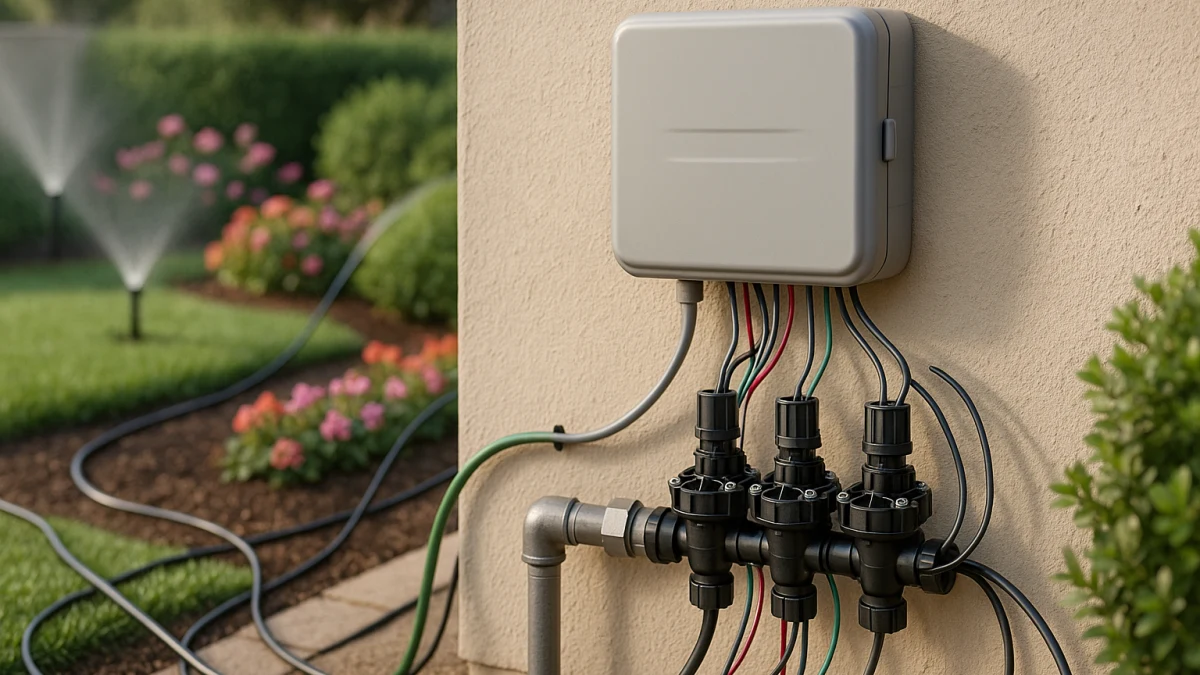
Multi-zone yard watering is not the same as shopping every irrigation product in a catalog. The useful starting point is zone count, then scheduling control, installation fit, and compatibility with the valves, wiring, power source, and water setup you already have.
A normal listing page can mix sprinkler controllers, hose timers, full-kit language, smart-control claims, shut-off valves, pumps, sprinkler heads, fittings, and other nearby plumbing products. This collection narrows the decision around what actually helps you choose a controller or timer for separate yard areas: visible 2-, 4-, 6-, and 8-zone language, station count, programmable schedules, indoor or outdoor placement, AC, battery, or solar power, and connected features such as Wi-Fi, Bluetooth, app control, rain delay, or sensor support when those details are shown.
Start with zones before smart features
Use this page as a quick fit check before comparing individual products:
| If you need... | Better fit |
|---|---|
| Separate lawn, bed, side-yard, or drip areas with different watering times | Choose a multi-zone irrigation system with enough visible zones or stations for each separate watering area. |
| Automatic watering on different days or times | Compare programmable schedules, automatic watering, timers, and controller features before prioritizing Wi-Fi or app extras. |
| Phone control, connected operation, or weather-related pauses | Look for Wi-Fi, Bluetooth, app compatibility, rain delay, rain sensor support, or smart scheduling, then verify current model and app details. |
| A way to turn off water feeding the irrigation line | Treat an irrigation supply shut-off valve as an isolation part, not as a replacement for a multi-zone controller or timer. |
The main comparison axes are zone or station count, scheduling flexibility, placement and power source, connectivity and app ecosystem, valve and wiring fit, and whether the product is really a controller or timer rather than an adjacent sprinkler or plumbing part.
Map yard areas to stations before browsing
Count the areas that need independent control before you compare features. A front lawn, side strip, garden bed, drip line, and backyard zone may each need its own output or station if they should water on different schedules.
Good listing cues include:
- Visible 2-zone, 4-zone, 6-zone, or 8-zone wording.
- Station or multi-zone language that maps to separate watering areas.
- Programmable schedules, automatic watering, timers, or smart scheduling.
- Indoor or outdoor placement details.
- AC, battery, or solar power information.
- Wi-Fi, Bluetooth, Smart Life, Tuya, app control, rain delay, rain sensor support, water usage tracking, or smart assistant language when you specifically want connected control.
The common mistake is buying for the nicest control feature first, then discovering the controller has too few stations for the yard.
Do not confuse shut-off isolation with zone control
An irrigation supply shut-off valve can be useful, but it solves a different problem. It may help isolate the irrigation line, but it does not create watering schedules, choose which yard area runs, or distribute water across multiple zones.
If your goal is to turn water on and off for maintenance or isolation, a shut-off part belongs in a separate plumbing decision. If your goal is to run different areas of the yard at different times, stay focused on irrigation controllers and timers with clear zone or station capacity.
What the listings can and cannot prove
The products shown here are most useful for comparing visible controller and timer traits:
- 2-, 4-, 6-, and 8-zone options.
- Sprinkler controller, irrigation controller, timer, station, or multi-zone wording.
- Programmable automatic watering and schedule controls.
- Smart scheduling, Wi-Fi, Bluetooth, app control, Smart Life, Tuya, rain delay, rain sensor support, water usage tracking, or smart assistant references where listed.
- Indoor, outdoor, AC, battery, and solar setup patterns.
Do not treat a short product summary as proof of complete sprinkler layout coverage, water pressure suitability, flow-rate suitability, backflow compliance, or universal compatibility with valves, wiring, sensors, master valves, or pump relays. Those are specification checks, not assumptions.
Compare multi-zone controllers and timers by station count
The products in this section are for shoppers choosing an irrigation controller or timer that can run separate watering areas. Start with the number of zones or stations, because each area that needs its own schedule needs a controllable output. A 2-zone timer may suit a smaller split setup, while 4-, 6-, or 8-zone controllers are the visible patterns to compare when the yard has more independently watered areas.
After zone count, compare how each product handles schedules. Basic programmable automatic watering may be enough if you only need recurring start times and days. Connected models can add Wi-Fi, Bluetooth, app control, Smart Life or Tuya references, rain delay, rain sensor support, smart scheduling, water usage tracking, or smart assistant compatibility, but those extras are only useful if the model also fits the station count, location, and power setup.
Read the products shown here as a scoped comparison surface, not as a complete design answer for the whole sprinkler system. Check whether each listing is meant for indoor or outdoor installation, whether it uses AC, battery, or solar power, and whether the connection style matches your setup. If you also need to isolate the irrigation line, handle that separately with a shut-off valve decision rather than treating it as an alternative to multi-zone control.
Spec checks before connecting valves and power
Before buying, open the product page or manufacturer materials and verify the details that determine whether the controller or timer can actually be installed in your system:
- Zone or station count: confirm it covers every separate watering area you plan to control.
- Valve compatibility: check valve type, required voltage or control method, and any supported thread or connection details.
- Wiring: confirm whether the controller matches your existing wiring layout or requires new wiring.
- Power source: verify AC, battery, solar, outlet location, and any required transformer or adapter details.
- Placement: confirm indoor or outdoor rating and where the unit can be mounted.
- Flow rate and pressure: compare the product requirements with your irrigation line conditions.
- Sensor support: check rain sensor or other sensor compatibility if you plan to use one.
- Master valve or pump relay needs: confirm whether the controller supports your setup before assuming it can run those components.
- App ecosystem: for Wi-Fi, Bluetooth, Smart Life, Tuya, or smart assistant features, verify the exact current model and app requirements.
Claims that need more than listing text
Some irrigation topics should not be decided from a brief catalog description alone. Backflow, anti-siphon, cross-connection, code, and permit questions depend on official local or regulator guidance, so treat them as compliance checks rather than product-page promises.
Likewise, app availability, Wi-Fi behavior, weather-skip performance, rain-delay behavior, smart-home compatibility, and current model support can change over time. If those features matter, verify them with current manufacturer information before purchase.
The practical sequence is simple: count the watering areas, choose the needed zone or station capacity, pick the scheduling and control style, then verify power, placement, valve, wiring, flow, pressure, sensor, master valve, and pump relay requirements before connecting anything.