
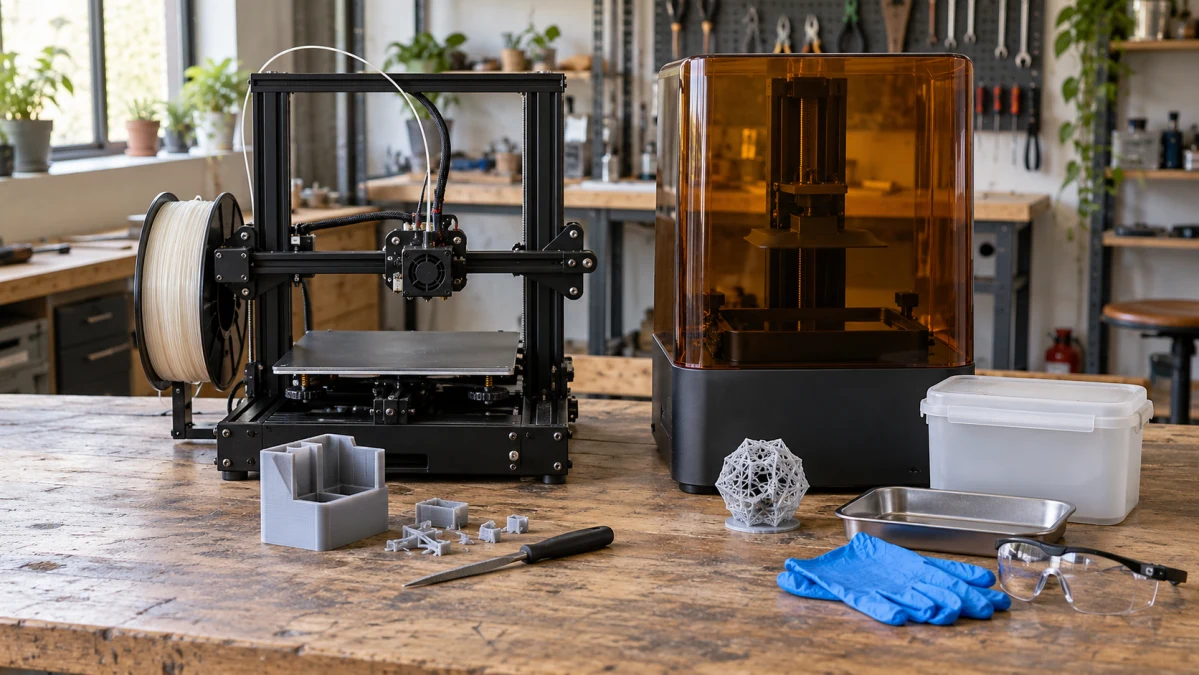
For drawer organizers, device stands and everyday replacement parts, a filament printer is usually the more practical first purchase. For tabletop miniatures, small display models and delicate surface textures, resin is often the better fit—provided you have room for handling, washing and finishing the prints. Prusa’s buyer’s guide makes the same broad distinction: filament is generally easier to get started with, while resin excels at small details.
Think about your first few projects before comparing machines. A storage tray, a miniature face and a bracket that must resist heat ask very different things of a printer.
Choose filament for everyday projects
Filament printers, also called FDM or FFF printers, melt plastic from a spool and deposit it through a nozzle. Their appeal for household projects is straightforward: you can make a useful object without handling a vat of liquid resin.
Start by choosing the plastic:
- PLA is a sensible starting point for indoor organizers, decorative objects and prototypes. It is relatively easy to print, but heat is a weakness. Prusa’s PLA guidance warns that it can soften and deform above roughly 60°C, or 140°F. A successful desktop print therefore says little about whether that material belongs in a hot car.
- PETG is worth considering for holders and other practical parts that need more toughness or heat resistance. Its tradeoffs include stringing, less forgiving overhangs and supports that can be difficult to remove. Prusa’s PETG guide explains those compromises. A plain storage bin and a complicated part with supports buried inside it can involve very different amounts of cleanup.
For a part that carries a load, orientation matters as well as material. FDM prints can be weaker across their layer bonds, as Formlabs explains in its technology comparison. A bracket printed in an unfortunate orientation may fail between layers. Choose the material, geometry and print direction around the forces the finished part will face.
For the High-Speed 3D Printer, LONGER lists a 225 × 225 × 265 mm build volume and confirms PLA/PETG support, automatic bed leveling and automatic Z-offset detection in its LK10 series FAQ. Those features help with bed and nozzle positioning; you still need a suitable material profile and a properly prepared print surface. Check the model name carefully: the larger LK10 Plus has different dimensions.
The Enclosed CoreXY 3D Printer Combo with AMS adds an enclosure and automatic filament switching. Its specified build volume is 256 × 256 × 256 mm, giving it more width and depth than the LK10, though slightly less height. An enclosure becomes particularly useful for materials such as ASA, which benefit from warmer printing conditions to reduce warping.
The original AMS holds four spools, which is useful for contrasting labels, lettering and multicolor decorations. Color changes also consume time and purge extra plastic through the nozzle; Bambu explains both tradeoffs. If most of your projects will be single-color organizers, consider how often you will use that capability before paying for the bundle. The original AMS uses desiccant for dry storage; it does not actively dry a damp spool.
Choose resin when small details matter most
Resin printers use light to harden liquid photopolymer. Their appeal is easiest to understand with a small figure: facial features, fabric texture and fine ornamentation put a premium on detail and surface finish. Filament can make decorative models too, but its deposited lines are generally more apparent. A smaller nozzle and finer settings can improve FDM detail, usually at the cost of printing time. Consider that option if occasional small decorative prints will be part of a wider mix of projects.
Material choice still matters. Standard model resins can be brittle, which is a drawback for thin parts that will be handled or dropped. Tough, flexible and other specialist resins behave differently. Prusa’s resin guide distinguishes these material families. Choose the resin for how the object will be used, as well as how it should look.
For the printers below, build area and serviceability are more useful shopping criteria than the touchscreen. Their manuals describe UV light passing through an LCD to form each layer. The control touchscreen is a separate component.
The LCD Touch Screen 3D Printer has a documented build volume of about 121 × 68.5 × 180 mm in its manufacturer’s manual. That relatively narrow platform makes checking the width of your models especially important.
The 3D Printer with Touch Screen offers 192 × 120 × 180 mm, according to its manufacturer’s manual. Its wider, deeper platform gives you more room for a larger model or several small figures at once. Leave space for the supports and orientation your print needs; the dimensions of the original model alone may underestimate the required space.
Before buying either Wanhao, confirm that you can obtain the correct replacement printing LCD and vat film, and download compatible slicing software that runs on your computer. The LCD is a wear item, and the D7 Plus support resources include separate instructions for replacing it and the vat film. A printer is a poor bargain if an ordinary replacement part leaves it idle.
Treat “dental” and “jewelry” descriptions as prompts to investigate the material. Something used in a patient’s mouth needs the appropriate biocompatible resin and validated processing, as illustrated by Formlabs’ biocompatible material requirements. A jewelry casting pattern similarly needs a suitable castable resin and burnout process. A detailed model of a ring or tooth does not establish either capability.
Allow time for the work after printing
With filament, a simple print may be usable after cooling and removal from the build plate. More complicated shapes can need support removal, trimming and sanding. Formlabs’ workflow comparison makes a useful point here: avoiding resin washing does not guarantee less finishing work, especially if you want a smooth painted surface.
With resin, expect to remove excess liquid resin by washing, dry the part and usually post-cure it with light. Follow the selected material’s instructions for the cleaner, support-removal sequence and curing conditions. Formlabs’ post-processing guidance explains why curing requirements depend on the material. A wash-and-cure station can make the routine easier, but check that it accommodates your prints and provides the conditions your resin requires.
Hollow resin models add another job. Hollowing can save material, but the cavity needs drainage and access for proper cleaning. Prusa’s hollowing instructions warn that uncured resin can become trapped inside a print without drainage holes. Consider that extra work before choosing resin for a large decorative piece.
Compare useful output, size and detail
Download the intended printer’s slicer—the software that prepares a model for printing—and try a few of your own projects before buying. Check whether they fit with supports, what material settings are available, and the estimated time and consumption. This is more informative than comparing maximum speed figures in isolation.
LCD resin printers expose a whole layer at once. That can make a batch of similarly sized miniatures efficient: adding figures beside one another may add much less printing time than adding height. Prusa explains this relationship between layer count and print time. You will still need to wash, remove any supports from and finish every figure, so a fast batch does not eliminate the hands-on work.
For detail, look beyond a resin printer’s “8K” or “12K” badge. Pixel size, optics, resin and exposure settings all affect the result. Layer height describes a different dimension, and neither number is a guarantee that two printed parts will fit together accurately. Formlabs’ resolution guide explains the distinction. Close-up samples of comparable objects—and measured fit where it matters—are more useful than a single resolution number.
Make room for printing and cleanup
Both filament and resin printing can release particles and vapors. Plan the location and ventilation before buying. NIOSH’s guide to safer 3D printing discusses source capture and ventilated enclosures; HEPA filtration addresses particles, while gases and vapors need appropriate additional controls. A cover or an unspecified filter does not tell you whether the setup addresses both.
Resin also needs a dedicated surface for handling wet parts, wash containers and spills. Use gloves compatible with the resin and cleaner and appropriate eye protection, following their safety data sheets. NIOSH’s resin-printing guidance covers exposure during printing, washing and curing. Include those stages when planning ventilation, and keep the work area separate from food preparation and out of children’s reach.
If the approved cleaner is isopropyl alcohol, account for its flammability and keep it away from ignition sources; Formlabs’ solvent-handling guidance covers storage and ventilation. Water-washable resin changes the cleaning liquid, but the contaminated water still needs collection. Anycubic’s water-wash resin instructions explicitly prohibit pouring that wastewater into drains.
Before committing to resin, find out how your local waste service handles contaminated cleaning liquids and supplies. Formlabs’ disposal guidance distinguishes liquid resin, contaminated solvent and cured material. Keep liquid resin and contaminated wash liquid out of sinks, and follow the relevant product instructions and local disposal requirements.
Compare the cost of a complete setup
Price the equipment needed to finish the objects you actually want:
- For filament: compatible filament, any required build-surface supplies, basic removal and finishing tools, and suitable storage or drying when the material needs it. Check replacement nozzle and build-plate costs, and include any ventilation equipment.
- For resin: compatible resin, protective supplies, washing containers or a wash station, approved cleaner, suitable curing equipment when required, and space and containers for waste. Check replacement vat-film and printing-LCD prices for LCD-based machines.
Check the seller’s package contents against that list. “Combo” does not necessarily cover the same accessories across different offers, and the printer’s build volume does not tell you whether a separate wash or cure unit can handle its largest prints.
Include supports, unsuccessful prints and, where relevant, multicolor purging in your running-cost estimate. A lower machine price can be outweighed by the accessories, material waste or replacement parts your projects require.
For a first printer that will make a mix of practical household objects, filament is the sensible default. Choose resin when the fine detail is central to the hobby and you have a workable place for its cleanup routine. If you only need an occasional detailed model, ordering that print from a service may make more sense than maintaining a resin setup.