
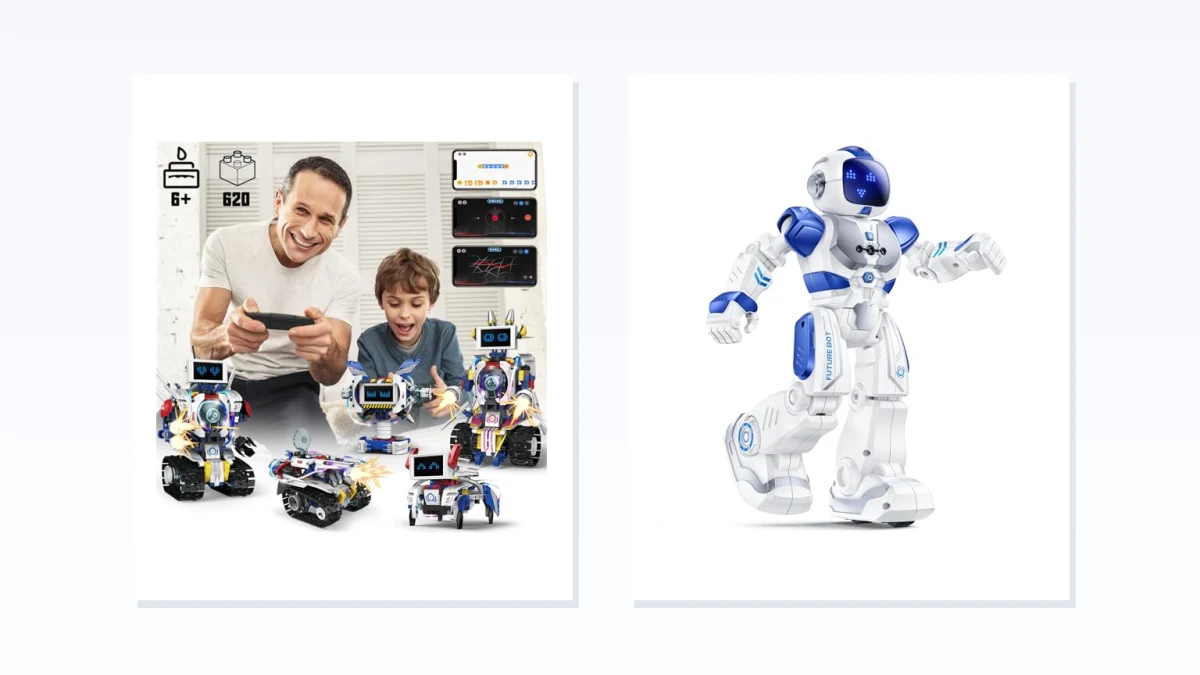
Buildable coding robots make construction part of the first project. Ready-to-code robots arrive as a finished robot, or require only minor setup, so a child can start entering commands sooner. Neither type is automatically more educational. The better first robot is the one that matches what the child wants to do first.
Choose buildable when the child enjoys block construction, can stay with a multi-step assembly, and would see the finished robot as a project they made. Choose ready-to-code when the main interest is making a robot move, repeat a sequence, or respond to a program without completing a large build first. “Ready-to-code” does not mean zero setup: charging, batteries, device pairing, an app, or an account may still be required.
Quick Comparison: Build First or Code First?
| If you need | Better fit | Why |
|---|---|---|
| Construction and coding to be one project | Buildable coding robot | Assembly is part of the activity, not packaging to get through |
| The first session to focus on commands and robot behavior | Ready-to-code robot | The body is already assembled or needs only limited setup |
| A screen-free first experience | Either, depending on controls | Buildable robots may still require an app, while some prebuilt robots use buttons, cards, or a remote |
| A path toward Scratch, Python, or another named environment | Either, if support is documented | Assembly style does not prove programming depth |
Two common look-alikes do not belong in either lane. A construction kit without a programmable control system is not a coding robot. A remote-control toy is not a coding robot unless it can store, arrange, or run a sequence of commands.
What to Check Before Comparing Products
- Assembly: Look for the number of pieces, estimated build time, tools, instructions, and whether the model can be rebuilt. If those details are missing, treat the build effort as unknown.
- Programming method: Find out whether commands come from buttons, cards, a remote, a phone or tablet app, or a named environment such as Scratch or Python. “Programmable” by itself does not tell you how much the child can create.
- Setup: Check batteries or charging, supported devices and operating systems, Bluetooth or Wi-Fi requirements, accounts, subscriptions, and whether an adult is likely to handle the first connection.
- Age and parts: Follow the manufacturer’s age guidance and warnings for the exact variant. The U.S. Consumer Product Safety Commission explains why small-parts labeling matters, especially for younger children.
Choose Buildable When Assembly Is Part of the Fun
A buildable coding robot should provide both a real construction task and a programmable control system. It is a good fit for a child who likes following diagrams, working with many pieces, and understanding how the moving parts connect before programming begins. It is a poor fit when a long build is likely to feel like a delay or when loose pieces and age suitability are concerns.
The trade-off is easy to see in a concrete example. On its current Robot J product page, Apitor specifies 480 blocks, six buildable models, an icon-based coding app, and Bluetooth control. The manufacturer also states ages 7–12 and notes that three AA batteries are not included. Construction is a substantial part of this project, and coding still depends on a compatible device.
Use these cards as a shortlist. For each exact variant, confirm that the box includes a programmable controller or coding interface, then compare piece count, instructions, age guidance, programming method, device requirements, and batteries. Remove a product from this lane if it only offers construction or remote-controlled movement.
Choose Ready-to-Code When Commands Should Come First
In this guide, ready-to-code means that a large construction project does not come before the first command. The robot may still need charging, batteries, pairing, or a short physical setup. This path suits a child who wants immediate feedback from sequences and robot behavior, or a household that does not want hundreds of construction pieces.
Programming depth varies widely in this lane. Ruko’s official 6088 technical specification lists one robot, a remote, a USB cable, and a manual in the package, and says its remote-control program can store 50 commands. That supports a quick start with command sequencing, but it is not evidence of app-based coding, Scratch, or Python. The example shows why “programmable” must be translated into the exact interface and limits before choosing.
Before choosing from this list, verify how commands are entered and what the robot can actually do with them. Check the exact setup steps, charging or battery requirements, recommended age, device compatibility, and whether the programming path can grow beyond the first few activities. Do not infer app support or advanced coding from the words “smart,” “remote,” or “programmable.”
Which Type Is the Better First Robot?
- Start with buildable if the child would happily spend the first session assembling and wants construction to be part of the achievement.
- Start with ready-to-code if the child wants to enter commands and see behavior sooner, and the available control method fits the devices and supervision you can provide.
- Choose by the documented programming environment, not by assembly style, if the goal is specifically Scratch, Python, or a longer coding progression.
- Pause on either type when the exact variant does not clearly state its assembly requirements, programming method, age guidance, or included parts.
The useful distinction is not “educational” versus “just a toy.” It is whether the child’s first challenge should be building the robot or programming its behavior. Decide that first, then verify the exact product rather than relying on a category label.