
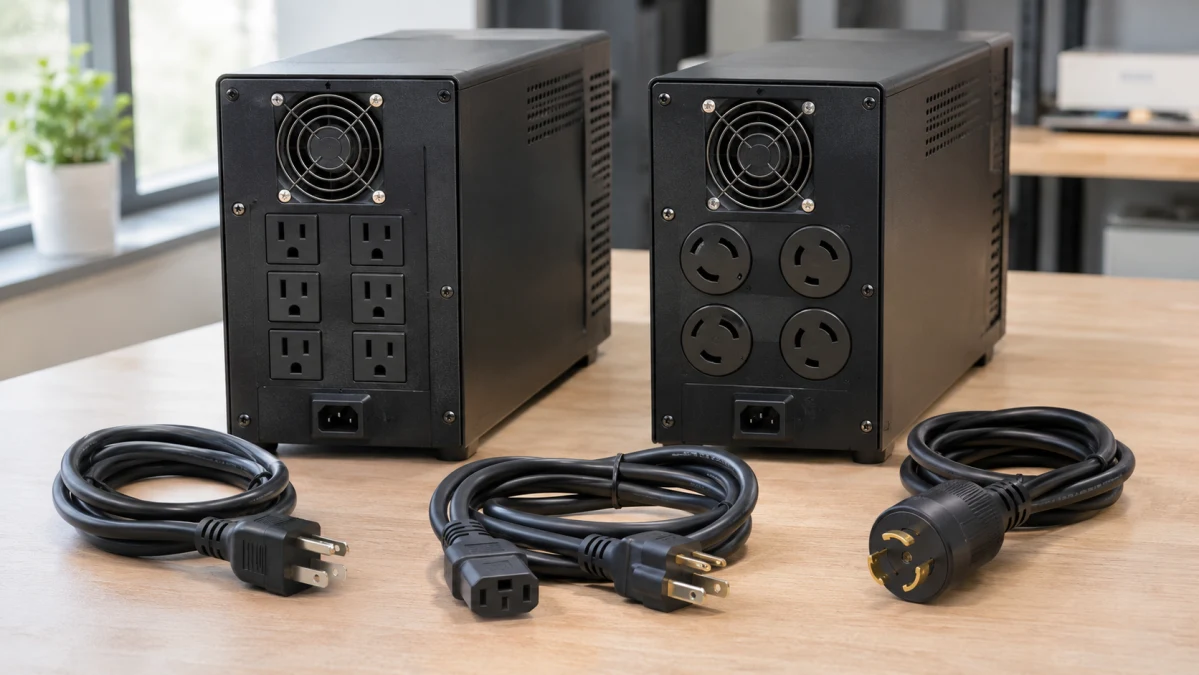
For a computer, monitor, and router connected to a standard U.S. wall outlet, a UPS with 120V input and 120V output is the usual starting point. Eaton’s home-office buying guide identifies this as the typical North American setup. A 208V UPS needs an installation and equipment that support it; a bigger capacity rating alone is no reason to change voltage.
Then comes the question that matters when the lights go out: how much time do you need? Saving your work, shutting down a storage server, and keeping networking equipment running through an extended outage call for different battery capacities and shutdown features.
Check the supply and your equipment separately
A UPS sits between the building’s electrical supply and your devices. Both sides need to match:
- At the wall: Check the circuit voltage, outlet type, and electrical-service requirements against the exact UPS model’s installation instructions.
- At the UPS outputs: Check the output voltage and receptacles. A voltage listed under “input” does not necessarily describe what the UPS delivers.
- At each device: Check its permitted input voltage, frequency, and any requirements for UPS power. Include monitors, storage devices, and network equipment—not just the computer.
A device rated only for 120V must not be connected to a 208V output. Likewise, 208V and 240V are different supply voltages: a UPS must explicitly support the one available at your location.
A plug adapter changes the connection, not the voltage. If the intended UPS needs a different outlet or circuit, have an electrician establish what the installation requires before buying. Eaton’s connection guidance makes matching the supply voltage and input plug part of choosing the UPS.
For a standard 120V outlet
For a desk or small network, count the devices that need battery backup, then compare power capacity and runtime. Plenty of sockets can be convenient, but they all share the UPS’s capacity.
The Cloud-Connected UPS has 120V input and output and a 1,000VA / 750W rating. It uses a NEMA 5-15P grounded input plug and ten NEMA 5-15R output receptacles. Eaton specifies recommended electrical service of 15A at 120V.
All ten outlets provide battery backup and surge protection. The 750W and 1,000VA limits apply to the combined load across those outlets.
Check the battery waveform
The SMART1000LCDNC is a line-interactive UPS with automatic voltage regulation, which can correct some supply-voltage fluctuations without drawing from its battery. However, its battery output is a modified sine wave, according to Eaton’s model-family brochure.
That distinction matters if your computer or other equipment specifies pure sine-wave backup. Check the equipment manufacturer’s requirements before buying; “line-interactive” does not by itself guarantee a pure sine wave.
Treat runtime as a separate specification
Eaton lists approximately seven minutes at half load—375W—and two minutes at the full 750W load. It also specifies no external battery expansion.
Those figures describe a short shutdown window at substantial loads. The 750W rating tells you how much power the UPS can supply, not how long it can supply it. Manufacturer runtime estimates also vary with battery condition and operating circumstances, so leave enough time for the shutdown you actually need.
Cloud control has a USB limitation
Remote management uses a wired Ethernet connection and an online account. Eaton includes cloud monitoring for ten years, but its Cloud-Connected UPS FAQ identifies a limitation that matters for computers and NAS devices: the USB-C port is for configuration and cannot monitor the UPS.
Do not assume you can connect that port to a computer and get conventional USB-triggered automatic shutdown. Verify a supported shutdown method for your device before buying. Remotely switching off an outlet is different from giving an operating system time to close files and shut down cleanly.
For a 208V equipment installation
If your location has a suitable 208V supply and your equipment accepts 208V, consider the complete installation: circuit, connections, battery runtime, and physical space. A server-class UPS can involve more than finding somewhere to put the box.
The Smart-UPS On-Line 5.4 kVA Online UPS supports 208V input and output, with 240V configurations also documented. At 208V in its normal online mode, APC rates it at 5,400VA / 4,800W.
Its connections are substantially different from those on the Eaton: a NEMA L6-30P input plug, two L6-20R output receptacles, and two L6-30R output receptacles, as listed in Schneider Electric’s exact-model specifications. These locking outputs do not provide ordinary 120V household outlets. Your equipment and its power connections must suit the configured output.
The circuit requirement is documented
APC’s SRT5K/6K installation guide explicitly includes SRT5KXLT. It lists 30A branch-circuit overcurrent protection and a typical 30A, two-pole input breaker for this model at 208/240V.
Have an electrician verify that the intended circuit and outlet meet the complete installation requirements. The plug designation alone does not establish that the wiring and protection are suitable.
What the larger system adds
This APC uses online double-conversion and provides sine-wave output. In normal double-conversion operation, incoming AC is converted to DC and back to AC, with no transfer interruption when the power source changes from utility to battery. Eaton’s explanation of UPS designs describes why this approach can suit sensitive equipment and locations with poor power quality.
For longer backup, Schneider supports up to ten SRT192BP external battery packs. The product listing also specifies that rack rails are sold separately. Additional batteries extend runtime; they do not increase the UPS’s watt capacity.
Placement deserves attention, too. Schneider’s detailed specifications list a weight of approximately 123 pounds and an acoustic level of 55dBA. Consider lifting, ventilation, and proximity to a workspace before ordering. These are manufacturer specifications, not measurements of how the unit will sound in your room.
Size the backup for the work you need to finish
Once the electrical connections are suitable, check both the watt and VA limits, with room for load peaks and future additions. Two UPS units with the same VA rating can have different watt capacities, as Eaton’s sizing guidance explains.
Then look up runtime at your expected watt load. If the equipment you plan to protect draws 400W, compare runtime at 400W. Comparing each UPS’s “half-load runtime” can be misleading when half load represents very different amounts of equipment.
Decide what must remain powered during that interval. A desktop may need its monitor long enough to save work. A storage server needs time to complete an orderly shutdown. Unattended equipment also needs compatible shutdown software and a supported communication method; battery capacity alone does not provide that automation.
A requirement for longer runtime or pure sine-wave output does not automatically mean you need 208V. Look for those features within the voltage and connection arrangement your installation supports. Choose the battery capacity and shutdown features around what you need to accomplish after the power fails.