
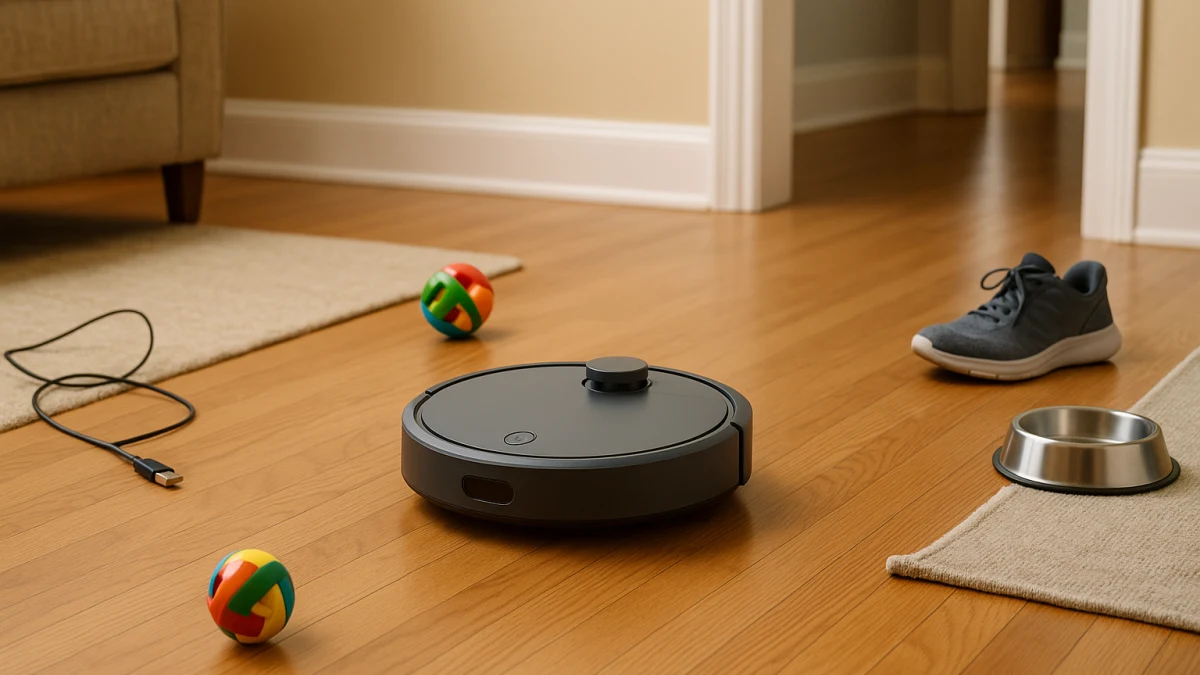
Robot-vacuum listings often put AIVI, RGB camera navigation, LiDAR, LDS laser navigation, infrared obstacle evasion, gyroscope navigation, app control, and Alexa support side by side. That makes it easy to pay for the wrong upgrade: a robot that maps rooms well may still not recognize a loose charging cable, while a camera-based model may not be the mapping tool you wanted for room-by-room schedules.
Use this page to separate three floor problems: small-object avoidance, mapped route planning, and basic bump-style navigation. The goal is less rescuing, not zero prep. Cords, toys, pet bowls, rug fringe, thresholds, low furniture, no-go areas, and camera comfort all belong in the decision before you compare the products shown.
Match the mess pattern before choosing the robot
| What your floor is like | Better fit | What to check before you buy |
|---|---|---|
| Cords, shoes, toys, pet bowls, or other small objects are often left out. | Camera or AI obstacle-avoidance robot vacuum | Look for explicit AI camera, RGB camera, AIVI, object recognition, pet-friendly avoidance, or obstacle-avoidance wording. |
| Multiple rooms, rugs, schedules, room selection, or blocked-off areas matter most. | LiDAR or advanced mapping robot vacuum | Look for LiDAR, LDS laser navigation, Smart Mapping, zone cleaning, room selection, no-go zones, or multi-floor mapping. |
| Rooms are mostly open and you pre-clear cords, rug fringe, toys, and small items before each run. | Budget bump or basic navigation robot vacuum | Treat infrared obstacle evasion, drop-sensing, gyroscope navigation, self-charging, Wi-Fi, Alexa, or remote control as basic convenience cues. |
| You want advanced routing but are not comfortable with camera-based wording. | LiDAR or advanced mapping robot vacuum | Verify the exact mapping and app features on the product page, especially no-go zones and room controls. |
The main split is small-object avoidance versus mapped route planning. Camera comfort, app-control depth, pre-cleaning tolerance, and your known stuck points decide which lane is worth paying for.
Start with the floor problem, not the feature name
- If the robot is often rescued from cords, shoes, small toys, or pet bowls, start with camera or AI obstacle-avoidance language.
- If the frustration is missed rooms, inefficient routes, or needing to keep the robot out of certain areas, start with LiDAR, laser mapping, Smart Mapping, room selection, and no-go zone language.
- If the floor is open and you already tidy before cleaning, basic navigation can be a value baseline rather than an overbuilt upgrade.
- If you dislike camera-based navigation or are unsure how images are handled, a non-camera mapping model may be a better direction, but the app features still need model-specific confirmation.
The navigation words that actually separate the lanes
Product cards usually separate the lanes with a few recurring phrases:
- Camera or AI obstacle avoidance: AI cameras, RGB camera, AIVI, object recognition, obstacle avoidance, pet-friendly avoidance, proactive illumination, and privacy-protection language.
- LiDAR or advanced mapping: LiDAR, LIDAR, LDS laser navigation, laser navigation, 360-degree scanning, Smart Mapping, room selection, zone cleaning, no-go zones, and multi-floor mapping.
- Basic navigation: infrared obstacle evasion, drop-sensing, anti-fall sensors, gyroscope navigation, self-charging, button or remote controls, Wi-Fi, Alexa, and basic app control.
Wi-Fi or voice control alone does not prove room maps, no-go zones, or AI object recognition. Self-emptying and mop features can be useful ownership conveniences, but they are not the same as smarter navigation.
Less rescuing is not the same as no pre-cleaning
No navigation label should be read as permission to leave every fragile item, cord, or loose piece of rug fringe on the floor. Even stronger navigation can be interrupted by thresholds, low furniture, dangling cables, pet bowls in tight corners, or unexpected clutter.
The better question is how much prep you realistically want to do. If you want to tidy less around small objects, look first at AI or camera obstacle avoidance. If you mainly want planned room coverage and blocked-off areas, look first at LiDAR or advanced mapping. If you are comfortable pre-clearing the floor, basic navigation may be enough.
Cords, toys, and bowls: choose camera or AI obstacle avoidance first
This is the first lane to compare when the floor often has small clutter: charging cords near sofas, kids’ toys, shoes by the door, or pet bowls that move around. The strongest product-card language here includes AI cameras, RGB camera navigation, AIVI, object recognition, obstacle avoidance, pet-friendly avoidance, proactive illumination, and privacy protection.
Use the products shown here as a clutter-avoidance pool. Scan each card for the exact type of camera or AI wording, then open the product page to see what object types, app settings, maintenance steps, and privacy language the manufacturer actually describes.
Read this lane as a way to reduce rescue missions around common small obstacles, not as a no-stuck guarantee. If your daily problem is mostly room selection, zone cleaning, or no-go areas rather than objects left on the floor, the LiDAR mapping lane may be the better upgrade.
Camera and pet-waste claims need maker proof
Camera-based wording deserves extra checking. Phrases such as privacy protection, proactive illumination, pet-friendly avoidance, and object recognition can mean different things by model.
Before relying on those claims, check the manufacturer’s product page for the object classes it recognizes, whether pet-waste avoidance is specifically named, how camera or image data is described, and what privacy controls are available. Do not treat a robot vacuum with cameras as a home security camera, and do not assume image processing is only on-device or never stored unless the maker says so.
Room maps and no-go areas: use LiDAR or advanced mapping
Choose this lane when the home layout is the main problem. LiDAR, LIDAR, LDS laser navigation, laser mapping, and 360-degree scanning point toward planned routes and room coverage rather than simple wandering.
The products shown here are most useful to compare if you want schedules, room selection, zone cleaning, no-go zones, or multi-floor mapping. Product cards may use similar mapping words, so verify the exact app controls for each model instead of assuming every laser-navigation robot has the same map features.
This lane is a strong fit for complex layouts and for shoppers who want advanced routing without leaning on camera-based object recognition. It does not mean the robot recognizes cords, pet waste, shoes, or toys; if those are the daily hazards, move back to the camera or AI obstacle-avoidance lane.
Do not read mapping as small-object recognition
A common wrong turn is buying a mapping robot to solve a clutter problem. No-go zones can help keep a robot away from selected areas when the model supports them, but that is different from recognizing a loose cord or a toy in the middle of a room.
Watch for these mix-ups:
- Treating LiDAR or laser navigation as if it automatically detects shoes, toys, cords, or pet bowls.
- Assuming Smart Mapping means every model supports room labels, no-go zones, multi-floor maps, and zone cleaning.
- Reading app control, Alexa support, or self-emptying as proof of advanced navigation.
- Using a virtual boundary for a stable area, then expecting the robot to react to small items that appear somewhere else.
Mostly open floors: keep basic navigation as the value baseline
This shorter lane is for open rooms with little floor clutter and a shopper who is willing to pre-clear before each run. Look for simple cues such as slim design, infrared obstacle evasion, drop-sensing, anti-fall sensors, gyroscope navigation, self-charging, remote control, Wi-Fi, Alexa, or basic app control.
Read these products as the baseline, not as the safest choice for clutter-heavy homes. They can make sense when you do not need room maps, no-go zones, or camera-based object recognition, but cords, rug fringe, toys, and small items should be cleared first. If the home is cluttered or has complex room boundaries, compare one of the two stronger navigation lanes instead.
The last check: cords, fringe, thresholds, and bowls
Before choosing, walk the rooms the robot will actually clean and answer these questions:
- Are charging cords, shoelaces, or toy pieces often left where the robot will run?
- Does rug fringe, a bath mat, or a lightweight runner tend to bunch up?
- Are there thresholds, low furniture, tight chair legs, or pet bowls that commonly trap small appliances?
- Do you need the robot to avoid a whole area, or to recognize individual objects that move around?
- Are you comfortable with camera-based navigation language, or would you rather use LiDAR mapping and verify the app controls?
- Do the product pages clearly explain brush design, filter type, replacement parts, and how to clean the robot after it handles hair or debris?
Buy the least complex navigation that fits those answers: AI obstacle avoidance for frequent small clutter, LiDAR mapping for room control and no-go areas, and basic navigation only when open floors and pre-cleaning are realistic.