
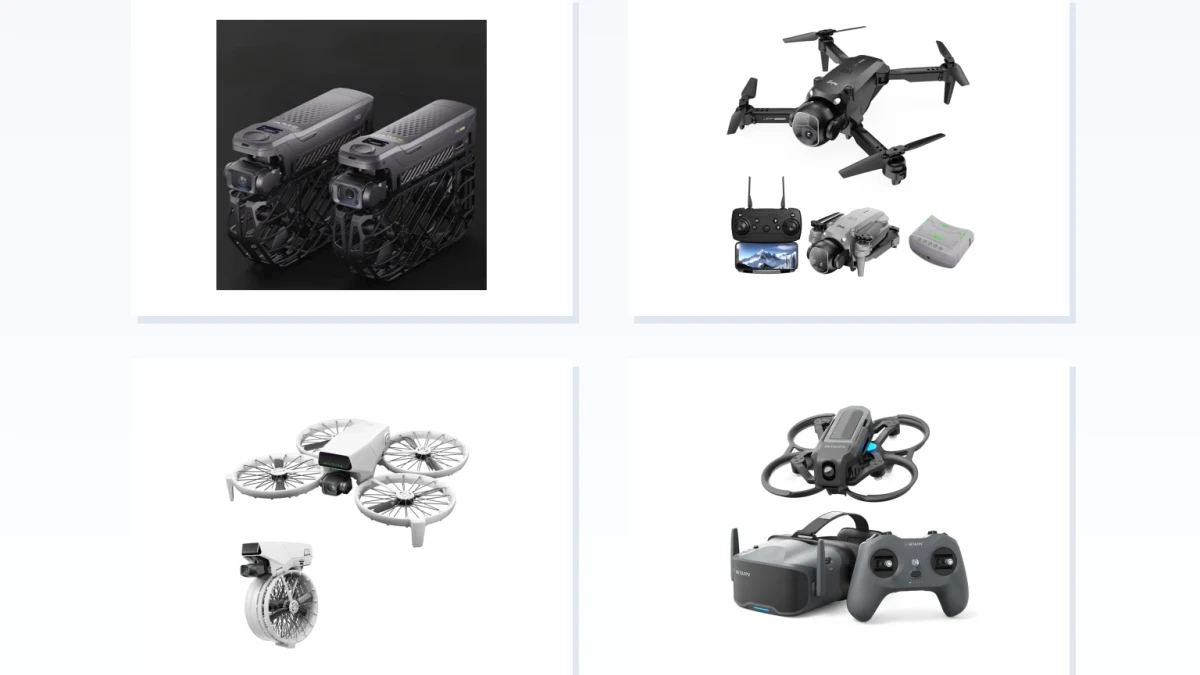
A Camera-focused drone is the better fit when stable aerial imaging and deliberate composition matter most. An FPV-focused drone is for shoppers who want immersive, hands-on flying through a confirmed first-person setup. Neither is the universal winner: the right choice depends on whether you want to compose the shot or feel more involved in flying it.
The label alone is not enough. A stabilized camera mechanism does not guarantee polished footage, and an FPV label or live feed does not prove that goggles, video hardware and controls form a complete first-person system.
The Core Difference: Compose the Shot or Fly From the View
A three-axis gimbal uses motors and gyroscope feedback to counter aircraft rotation, while allowing the camera to be directed independently within its mechanical limits (DJI technical documentation). That separation is useful when you want to fly a route while deliberately adjusting the framing. It supports composition-oriented work; it is not, by itself, proof of smooth footage, high image quality or easy handling in every condition.
FPV puts more emphasis on the aircraft's view and on how directly you command its movement. In Acro/rate mode, self-leveling is removed and stick input controls rotation rate directly (Unmanned Tech's Acro-mode explanation). That can suit someone who values active maneuvering and flight-oriented footage, but the demand depends on the selected mode rather than the FPV label alone.
The overlap matters. BETAFPV describes Aquila20's N mode as using barometer-based altitude hold and stable hover, while its S and M modes disable assists for direct flips, rolls and maneuvering (BETAFPV). An FPV-focused model can therefore offer a more assisted mode as well as a more direct one. Choose according to the balance you want between framing, hover assistance and pilot involvement.
Choose a Camera-focused Drone When Composition and Stabilized Camera Control Come First
Choose this lane if your main question is whether you can direct the camera separately from much of the aircraft's rotation while setting up a shot. A documented three-axis gimbal is the relevant mechanism, but it does not establish practical range, image quality or typical flight duration.
The C-FLY Faith Mini 2 is a camera-oriented example rather than a performance ranking. Its supplier listing describes a foldable 249 g design, a three-axis brushless gimbal, 20 MP photos, 4K/30 fps video and a claimed maximum flight time of 32 minutes (supplier listing). Those supplier-stated attributes make it worth considering if you want a compact aircraft with a mechanically stabilized camera arrangement. They do not establish real-world image quality, typical endurance or range.
The same listing's claimed 5 km WiFi FPV figure does not tell you whether you will view video on a phone, a controller-mounted screen or goggles. Nor does the supplied documentation establish the included viewing equipment, recording destination or a complete transmission configuration. If any of those details matters to your purchase, get them from the exact bundle documentation before treating this as the right imaging setup.
Verify the Viewing System Before You Expect FPV
A live feed is not automatically a goggles-centered FPV experience. Start with an observable check: if you look at a phone or screen mounted on the controller, it is a screen-view arrangement; if you wear goggles receiving the aircraft's documented video link, it is a goggles-centered arrangement. DJI's RC-N1, RC-N2 and RC-N3 controllers, for example, connect a mobile device by cable and hold it on the controller for video linking (DJI support documentation). That example illustrates the distinction, not the viewing method of the camera examples above.
For a first-person setup, confirm the complete chain for the exact package: the aircraft's video transmitter or link, compatible goggles, the radio transmitter or controller and any receiver required for control, batteries and charging equipment, and the recording location if footage matters. WiFi, “real-time” video, goggles compatibility, an FPV label or a stated transmission distance does not establish that chain.
The Aquila20 HD FPV Kit is a useful positive example because BETAFPV lists the quadcopter, LiteRadio 4 SE transmitter, VR04 HD goggles, two quad batteries, two 18650 goggle batteries and a charger. The manufacturer says the goggles record HD footage to microSD with one-button recording (BETAFPV kit page). Those contents apply to that named kit, not automatically to a separately bought aircraft or another bundle.
In the US, goggles do not permit solo beyond-visual-line-of-sight flying. For recreational operations, the FAA requires the drone to remain within visual line of sight or a co-located visual observer to be in direct communication with the operator (FAA recreational-flyer guidance). Under Part 107, when FPV or similar technology is used, a visual observer must keep the aircraft in unaided sight (FAA Part 107 guidance). Plan a goggles flight around that practical limit rather than treating the video view as permission to fly out of sight.
Choose an FPV-focused Drone Only After Confirming the Complete First-Person Setup
Favor this lane when the attraction is flying through a documented first-person system, rather than simply receiving a camera feed. Confirm compatible goggles, video link and controller for the precise configuration, then choose the mode that matches how much direct control you want.
The BETAFPV Aquila20 HD illustrates a complete route into that experience because its named kit documents the goggles-and-controller package. For its P1 configuration, BETAFPV specifies a P1 HD video transmitter (VTX), 1080p/60 video, approximately 60 ms latency and transmission above 400 m (BETAFPV configuration page). These are manufacturer specifications for that configuration, not independent measurements of latency, range or reliability. Its documented N mode is the option to consider if assisted hovering matters; its S and M modes fit the buyer seeking more direct maneuvering.
Configurable FPV aircraft show why the word “FPV” is not a shopping shortcut. The DeepSpace SEEKER3 page offers versions explicitly labelled without a video transmitter and camera, alongside DJI O4 Pro and analog video options with different radio-control configurations (DeepSpace SEEKER3 page). A version without a video transmitter and camera cannot provide its own onboard video system. The video link to the goggles and the control link to the radio controller are separate compatibility checks. Confirm which receiver is included and whether it supports your controller’s radio system; then check the video equipment, batteries and recording hardware before assuming the chosen variant is ready to fly.
Favor a Camera-focused drone if your priority is composition-oriented aerial capture with a documented mechanically stabilized camera arrangement, and verify the exact viewing and recording setup if those are essential. Favor an FPV-focused drone only when the exact bundle confirms compatible goggles, video link and controls, and when you are willing to select the appropriate control mode and operate within the US visual-line-of-sight rules. Pause rather than force either choice if the listing does not document the bundle, viewing device, recording arrangement or compatible configuration.